
Tipasa release notes, April 2022
Release Date: April 24, 2022
Introduction
This release of Tipasa provides a new feature in addition to several bug fixes. This feature will help you manage more complex workflows, including:
Many of these enhancements are the direct result of your feedback.
Recommended actions
For this release, we recommend that you review the following checklists and complete the relevant tasks so that you can adjust your policies and workflows and train your staff. These checklists identify updates that we have determined as significant for most institutions. We encourage you to review all of the items in the release notes to determine whether there are other items that might require additional action or follow up by your institution.
Administrative actions
These items require immediate action or decisions.
| Azione |
|---|
|
For best performance, it's very important to clear your browser's cache before starting to work with Tipasa! |
|
Be sure to utilize Smart fulfillment functionality, including:
|
|
If your library uses WorldShare Management Services (WMS), we encourage you to verify that your integrations with WorldShare Circulation and WorldShare Acquisitions are set up to best meet your needs. https://help-it.oclc.org/Resource_Sharing/Tipasa/WorldShare_Circulation_Integration https://help-it.oclc.org/Resource_Sharing/Tipasa/WorldShare_Acquisitions_integration Note: Local holdings and availability (OPAC) integration has been turned on for all WMS libraries. |
|
If your library uses Ex Libris Alma, we encourage you to enable OPAC integration for automatic retrieval of local holdings and availability information and circulation integration for automatic creation of temporary items and automated checkout/check-in. Please contact OCLC Support to request these be enabled. |
|
If your library uses Innovative's Sierra, we encourage you to enable OPAC integration for automatic retrieval of local holdings and availability information. Please contact OCLC Support to request these be enabled. |
|
For all other library systems, if the link to your library’s catalog has not been set up or if the link needs to be updated, follow the instructions below. When you have enabled your online catalog links, you can quickly search your catalog for requested items as a borrower or lender. https://help-it.oclc.org/Resource_Sharing/Tipasa/Reference/Search_my_library's_online_catalog |
| Have you updated addresses within each of your borrower and lender Constant Data records in OCLC Service Configuration? If not, please do so on behalf of all your borrowing and lending partners. Address labels do not print properly unless the addresses are formatted correctly. |
|
Have your contact information or lending policies changed? If so, please make the appropriate updates in OCLC Policies Directory. |
|
Don't forget to utilize the reporting capabilities for Tipasa in WorldShare Report Designer. An overview recording is available in the OCLC Community Center: https://www.oclc.org/community/ill_prime/events/analytics.en.html |
Follow-up actions
In an effort to keep your staff informed of new features and changes, you may also want to consider these items.
| Azione |
|---|
|
Share these release notes with your colleagues. |
|
Have you signed up for email alerts for News in the Community Center? This ensures that Tipasa release notes and events come straight to your inbox. |
New features and enhancements
Use new off-system requesting functionality to track all ILL requests
With this initial release, you can now track requests between your library and a library or organization that does not use an OCLC resource sharing solution within the Tipasa staff interface. These off-system partners typically use email as their primary form of request communication and do not have access to a protocol-compliant ILL system. In the coming months, we will release additional functionality of off-system requesting.
Benefits of off-system requesting include:
- Track all your requesting activity within Tipasa.
- As a borrower, manage requesting, receiving, and returning materials from an off-system lender.
- As a lender, manage reviewing, responding, sending, and processing returns from your collection to an off-system borrower.
- Review off-system requests in your library's Borrower/Lender Resource Sharing Stats Report in OCLC Usage Statistics.
Off-system request queues
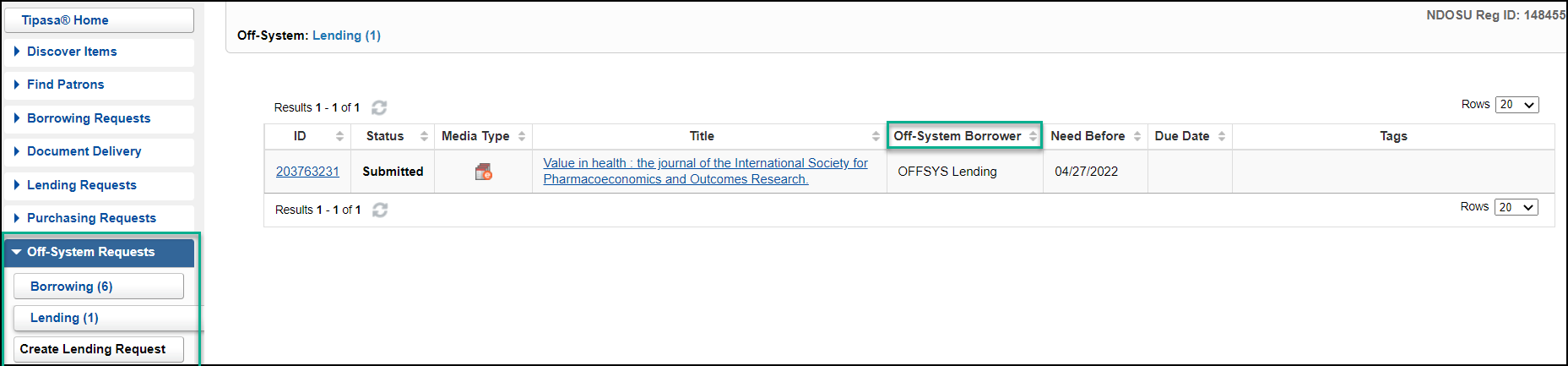
Off-system requests appear in their own dedicated queues, one for borrowing and one for lending. Within each queue, all active off-system requests are displayed together regardless of their status, but the list of requests can be sorted by any of the column headings. The off-system queues look much like the regular borrowing and lending request queues, with some slight variations, including the Off-System Lender column in the off-system borrowing queue:
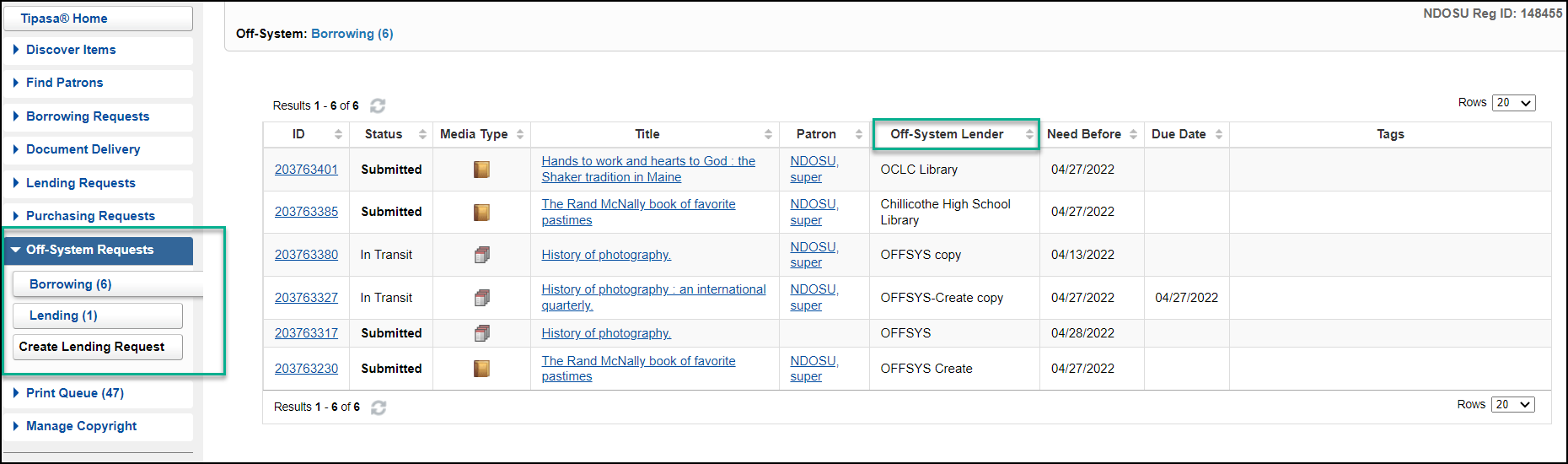
As well as the Off-System Borrower column in the off-system lending queue:
The off-system request display
Clicking on any of the entries in the off-system request queues will open an off-system request display. It follows a layout similar to standard ILL requests, but with a few differences:
- The top part of the initial accordion section shows information about type of request and the state of the current transaction.
- All the significant dates are shown on the right and read top-to-bottom in lifecycle order.
- The bottom part of the first accordion displays all the bibliographic details.
- Below the bibliographic details, the standard set of accordions for lender, borrower, patron, and request history are displayed. These all look the same as they do for a standard ILL request.
Because the other partner institution in these requests is off-system and is only communicating outside of the system (mostly via email), you will need to manually update information for both sides in the request.
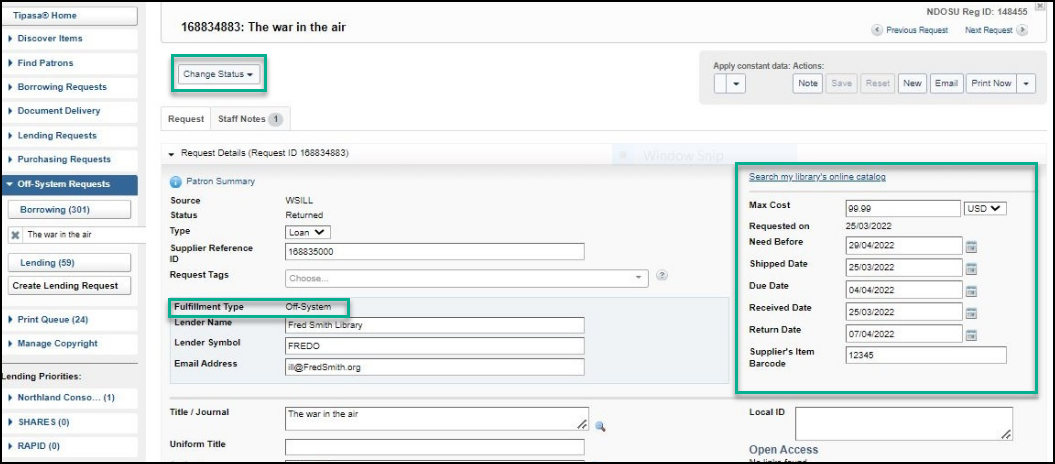
You will have to manually trigger all the status changes, including those that would normally be performed by the other party. For example, if you're the borrower, you'll need to mark the request as Shipped when the off-system lender sends you a "Shipped" email.
Because the flow of messages may be different from a traditional on-system ILL request, the off-system requests queue has a drop-down list of actions applicable to the current status of the request. This differs from the action buttons that exist in the regular lending and borrowing queues.
Creating an off-system borrowing request
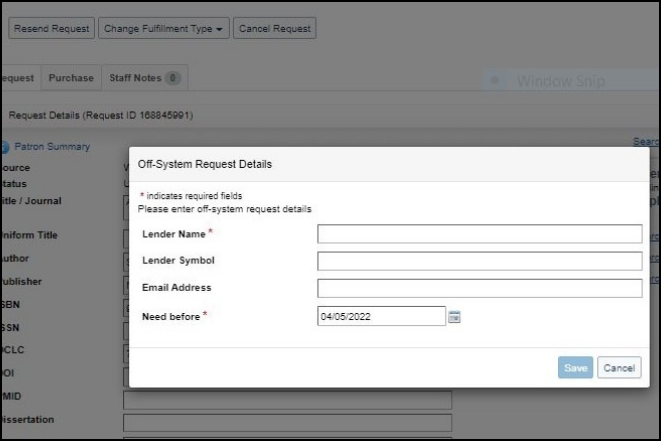
You will typically only need to borrow from off-system lenders when you have exhausted your in-system lender options. You can create off-system borrowing requests by taking an existing ILL request and changing its fulfillment type to "off-system request".
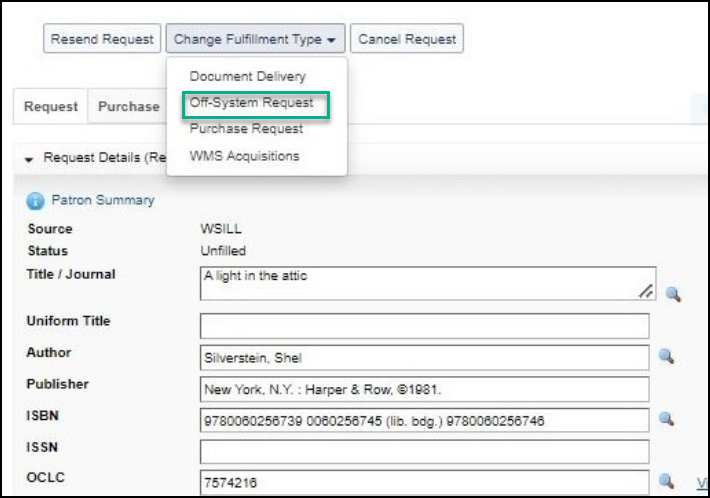
Before the request is moved to the off-system request queue, you will be prompted to fill out off-system lender details such as the lender name and need-before date:
Responding to a request from an off-system borrower
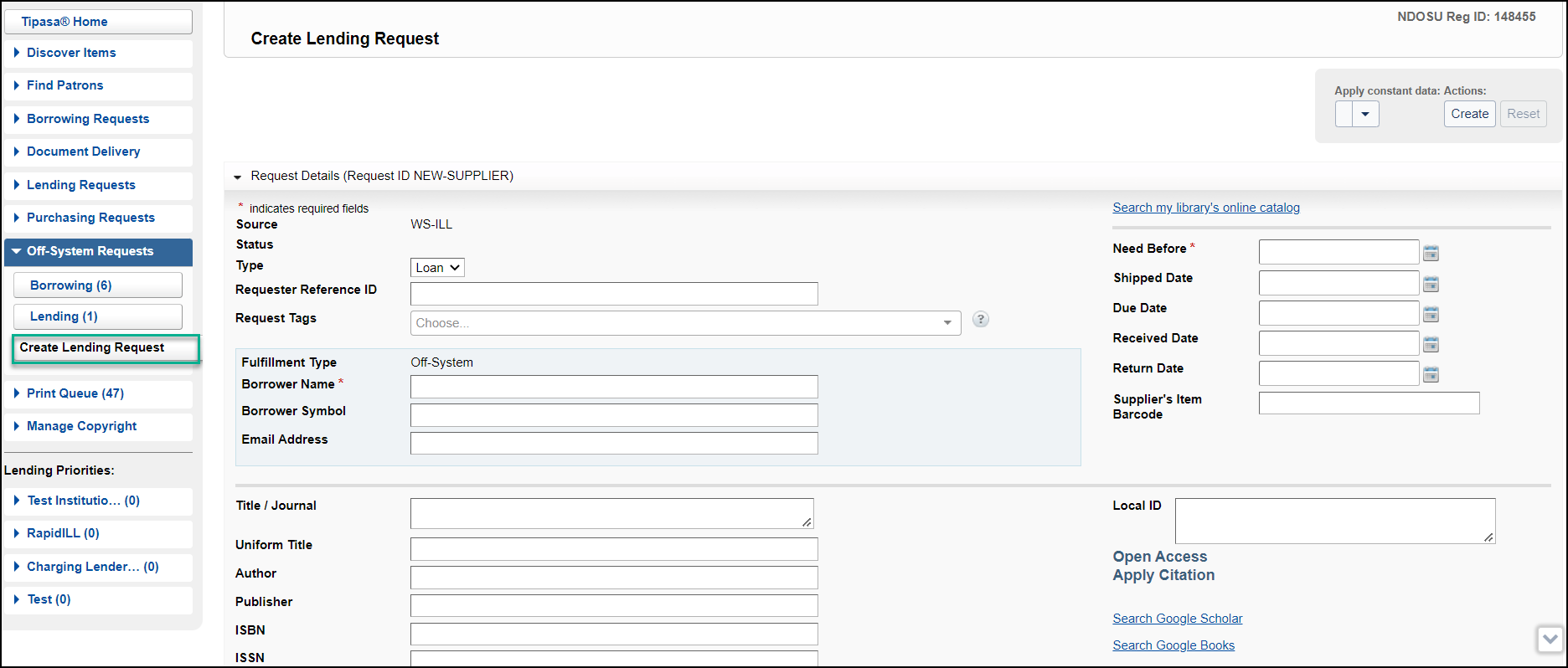
In this initial release, you will need to manually create new off-system requests to represent incoming email/off-system lending requests. A Create Lending Request button is available in the Off-System Requests queue under Borrowing and Lending sub-queues.
You can copy and paste or type request details from the email into the new blank request form, as well as indicate who the borrower is and store the requesting system's Request ID in the Requester Reference ID field. Future releases will streamline this for less manual data input.
Updating off-system request details
Once an off-system request has been entered into the system, it will appear in the appropriate off-system request queue and is searchable in the same way that traditional ILL requests are.
Off-system requests will need to be edited for two main reasons:
- You need to process and respond to an incoming email message from the request's off-system partner.
- You need to instigate the next phase of the ILL transaction and send an email indicating the change to the request's off-system partner.
All fields in off-system requests are always editable. Certain fields are considered essential, and the system will warn you if these fields are accidentally removed or were never entered:
- Partner name
- Need-before date of the request
- Title of the item being requested
Processing updates received from an off-system partner related to an existing off-system request
When you receive updates from an off-system partner for an existing request, the Note option is an ideal place to keep track of these updates as Staff Notes. You can copy and paste or manually enter emails, dates, addresses, and other information into the notes field. The update from your off-system partner may also be reason to change the status of the request.

Sending emails to an off-system partner
When it is time to cancel, ship, receive, return, or check-in an off-system request, it is recommended that you make the necessary updates to the request details before changing the request status using the Change Status drop-down list. Note that changing the status automatically saves any changes that have been made.
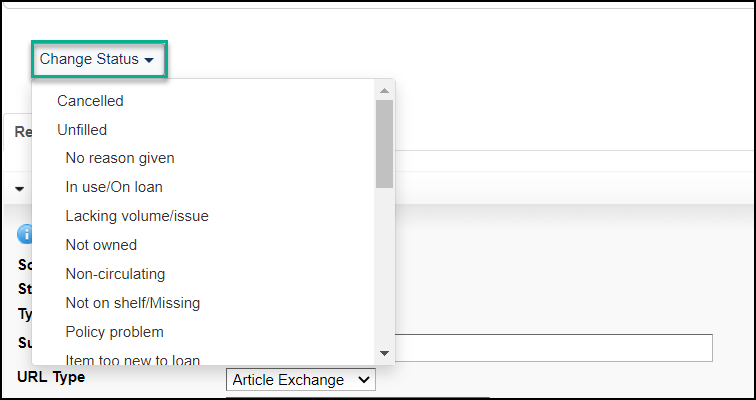
Finally, you should use the Email button to send an appropriate email to the off-system partner.

You can type in (or select from your Contacts) the email address to which to send this email. The sent email will later appear in the notifications section of the request history accordion on the request.
For the initial release, you will be able to select an appropriate custom notification template. We recommend having separate templates for each of the major actions:
Request, Cancel, Shipped, Unfilled, Received, Returned, etc., because this makes them more easily identifiable in the notification history.
Doing things in this order ensures that the email contains all the correct details, including the correct request status.
In a future release, the sending of appropriate email messages will be automatically triggered by a change of request status, and OCLC will supply a special set of pre-defined off-system message templates to be used by the automated messaging.
Reviewing statistics of all off-system requests
You can now review off-system requests using OCLC Usage Statistics and Report Designer, so that you can track your off-system requests along with all your other forms of ILL requests.
Off-system requests will appear in the Borrower/Lender Resource Sharing Stats Report in Usage Statistics. For the initial release, all off-system requests displayed in statistics and reports will show the off-system partner as having the "OFSYS" OCLC symbol. In future releases, we will be introducing the ability for you to maintain a table of your known off-system partners, where each partner can be assigned a unique symbol, and these unique partner symbols can be used instead of the generic "OFSYS" symbol.
For more information, see Off-system borrowing and Off-system lending.
Bug fixes and Known Issues
A list of current and recently fixed issues can be found here.
Important links
Product Insights: Resource Sharing
To help you become familiar with the enhancements and fixes included in this release, please attend the upcoming webinar Product Insights: Resource Sharing.
Date: Wednesday, July 20, 2:00pm, Eastern Daylight Time (New York, UTC -04:00)
Registration: https://www.oclc.org/community/ill_prime/events/rspi-july-2022.en.html
Please note the session time zone when registering. The sessions will be recorded and archived for future viewing on the OCLC Community Center. Please register, even if you are unable to attend, to receive a link to the recorded session.
OCLC Resource Sharing Conference (RSC22) web series
OCLC invites you to register for upcoming presentations in the 2022 OCLC Resource Sharing Conference web series. This year’s series of free, virtual sessions features ILL 101 sessions, automation, controlled digital lending, and moving resource sharing forward during this challenging time. Recordings are available in the community center if you are unable to attend live.
RSC21 includes these sessions:
- Thursday, May 5, 2022 12:00 pm | Working smarter not harder: How to automate your holdings and configure policies to expedite fulfillment
- Tuesday, May 10, 1:00 pm | Lightning sessions: Resource sharing at the Internet Archive and E-book lending/borrowing demystified
- Wednesday, May 25, 2:00 pm | The persistence of CONTU: The results of two surveys
- Tuesday, June 14, 11:00 am | A look into the future of ILL services
- Tuesday, June 21, 1:00 pm | Controlled digital lending during global COVID-19 and beyond
You're also invited to view recordings of past sessions in this series:
- Controlled digital lending for resource sharing: Law and policy since 2018 | Recording
Virtual Workshop Series: Learn how to fine-tune your ILL setup
The series included the following topics:
- Part 1: Fine-tune your policies and deflections (recording, slides, and checklist available)
- Part 2: Construct your custom holdings (recording, slides, and checklist available)
- Part 3: Automate your request process (recording, slides, and checklist available)
- Part 4: Curate and care for your constant data (recording, slides, and checklist available)
- Part 5: Make your usage statistics count (recording, slides, and checklist available)
Support websites
Support information for this product and related products can be found at: