
My Account release notes, December 2021
Release Date: December 8, 2021
Introduction
This release of My Account provides new features and enhancements to help you offer an improved experience for you library users, including:
These enhancements are the direct result of your feedback.
Recommended actions
For this release, we recommend that you review the following checklists and complete the relevant tasks so that you can adjust your policies and workflows and train your staff. These checklists identify updates that we have determined as significant for most institutions. We encourage you to review all of the items in the release notes to determine whether there are other items that might require additional action or follow up by your institution.
Administrative actions
These items require immediate action or decisions.
| Azione |
|---|
|
If your library uses both Tipasa and WorldShare Management Services (WMS), we encourage you to verify that your integration is set up to best meet your needs. For details, see Set up integration. With questions or for assistance with setup, contact OCLC Support. |
|
For Tipasa or WorldShare ILL, be sure to utilize Smart fulfillment functionality, including: |
Follow-up actions
In an effort to keep your staff informed of new features and changes, you may also want to consider these items.
| Azione |
|---|
|
Share these release notes with your colleagues. |
|
Redesigned WorldCat Discovery search results and item details pages deliver an experience that helps users more intuitively find and get resources from your library. The WCAG 2.1-compliant interface also enables us to deliver enhancements to WorldCat Discovery more quickly in the future. |
|
Have you signed up for email alerts for News in the OCLC Community Center? This ensures that release notes and events come straight to your inbox. |
Include Request ID with problem reports
When reporting an issue with My Account or WorldCat Discovery, it's very helpful to include the Request ID. It can be found at the bottom of the screen on which the issue occurred. Including this information allows us to directly trace what happened on the request we are troubleshooting.

New features and enhancements
Choose your own label for the Resources menu
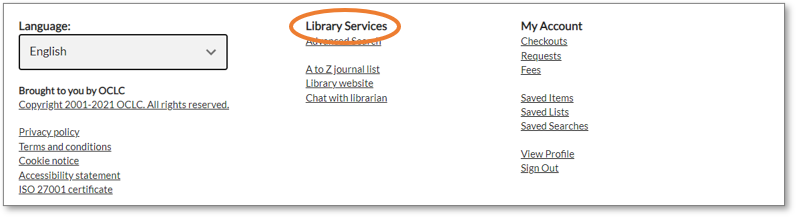
You can now specify custom text for labeling the Resources (custom links) menu on the navigation bar and footer. Previously, the label was Resources for all institutions.
Navigation bar

Footer
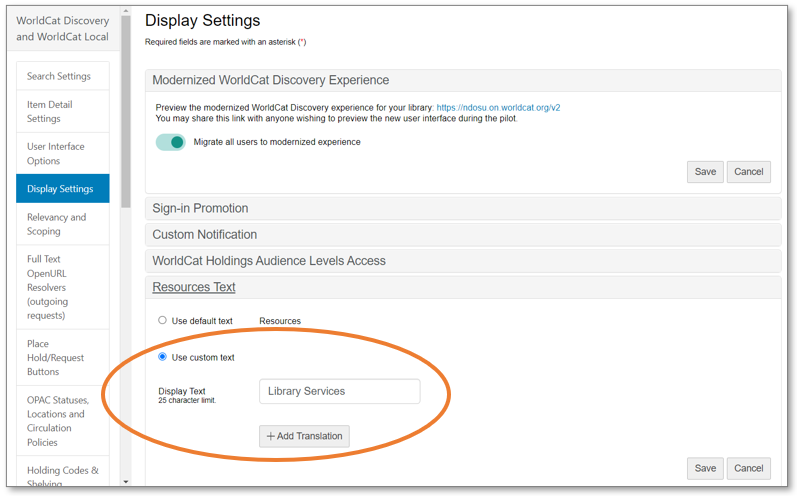
To configure this menu label in OCLC Service Configuration, go to WorldCat Discovery and WorldCat Local > Display Settings > Resources Text. You may retain the default label (Resources) or enter a custom label. You can also specify translations for the custom label for any of the supported languages appropriate for your community.
For more information see Access and customize My Account.
Ensure library users receive updates on ILL requests
For libraries with Tipasa - beginning December 12
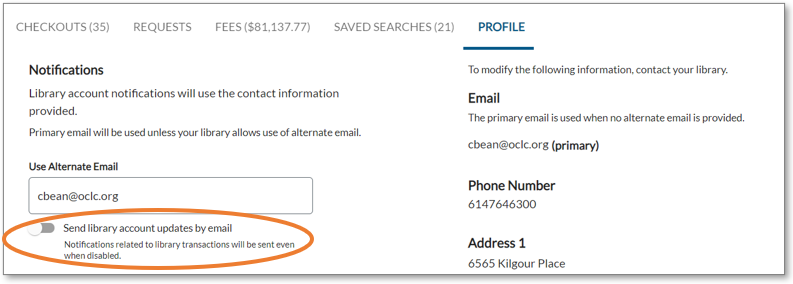
You can now ensure your library users are sent email notifications related to ILL requests. Previously, users could opt out of receiving these emails.
Because Tipasa notifications are associated with a specific ILL request, all email notifications are now flagged as transactional. Even if the user previously opted out of Tipasa email notifications, the notifications will now be sent. The description on the Profile tab has been updated to describe this change.
For more information, see Send notifications to borrowers.
Nota
Cookie notice and accessibility statement now available
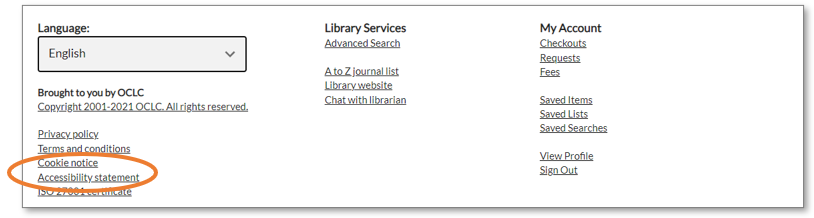
With two new links located in the footer, your library users can now access the cookie notice and accessibility statement. My Account did not previously link to this information.
New default colors for custom message
If you have configured a custom notification message to display at the top of the My Account page, it now appears in dark gray with white letters, to ensure sufficient contrast that supports accessibility. When this capability was released in September 2021, the message utilized a color from your institution's Branding & Customization.

Bug fixes
My Account displays incorrect due date for recalls
For libraries with WMS - beginning December 12
An incorrect due date was sometimes displaying in the Checkouts tab for recalled loans. As of this release, the correct due date and time for recalls will display to the user in My Account.
Known issues
For a full list of current and recently fixed issues, see Known issues for My Account.
Important links
Post-release sessions
To help you become familiar with the new features, enhancements and improvements included in this release, update sessions scheduled. Please note the session time zones when registering. The sessions will be recorded and archived for future viewing on the OCLC Community Center. Please register, even if you are unable to attend, to receive a link to the recorded session.
-
- Product Insights: WorldShare Management Services
- Date: Tuesday, December 14, 2021, 1:00 pm EST
- Register Now
- WorldCat Discovery
- Product Insights: WorldCat Discovery
- Date: Thursday, January 20, 2022, 12:00 pm EST
- Register Now
- Tipasa
- Product Insights: Resource Sharing
- Date: Wednesday, February 2, 2022, 2:00 pm EST
- Register Now
Support websites
Support information for this product and related products can be found at: