
Tipasa release notes, October 2023
Release Date: October 22, 2023
Introduction
This release of Tipasa provides a number of new features and enhancements in addition to several bug fixes. These features will help you manage more complex workflows, including:
- Enable Proven Senders to automatically receive requests from all suppliers
- Integrate with SirsiDynix Symphony or Horizon to keep your circulation and ILL systems in sync
Many of these enhancements are the direct result of your feedback.
Recommended actions
For this release, we recommend that you review the following checklists and complete the relevant tasks so that you can adjust your policies and workflows and train your staff. These checklists identify updates that we have determined as significant for most institutions. We encourage you to review all of the items in the release notes to determine whether there are other items that might require additional action or follow up by your institution.
Administrative actions
These items require immediate action or decisions.
| Azione |
|---|
|
For best performance, it's very important to clear your browser's cache before starting to work with Tipasa! |
|
Be sure to utilize Smart fulfillment functionality, including:
|
| Have your contact information or lending policies changed? If so, please make the appropriate updates in the OCLC Policies Directory. |
Follow-up actions
In an effort to keep your staff informed of new features and changes, you may also want to consider these items.
| Azione |
|---|
|
Share these release notes with your colleagues. |
|
If you haven't already, visit the new OCLC Community Center for new ways to connect with OCLC and other community members. To make the most of the new community structure:
|
New features and enhancements
Enable Proven Senders to automatically receive requests from all suppliers
With this release, you now have more options for specifying proven senders, those suppliers for whom requests are automatically received and provided to the patron via Article Exchange. Previously, this feature required you to create and specify a custom holdings group of proven senders.
Now you can enable proven sender functionality for:
- All suppliers
- Only suppliers in a specified custom holdings group (the option available previously)
- All suppliers except those in a specified custom holdings group
To enable or update your proven sender options, go to OCLC Service Configuration > Advanced Workflows > Proven Senders.
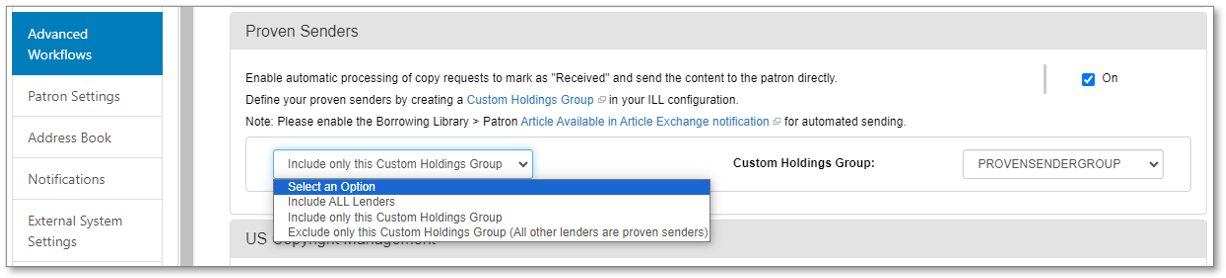
If you had not previously enabled the proven senders feature, the selection will be off by default. If you did previously enable this feature and specified a custom holdings group for proven senders, the system will continue to use that group.
If you wish to enable proven sender for all suppliers or to specify a group of lenders to exclude, you can make the appropriate selections and click Save.
For more information, see Proven Senders.
Integrate with SirsiDynix Symphony or Horizon to keep your circulation and ILL systems in sync
Available October 31
Circulation integration is now available for SirsiDynix Symphony and Horizon. Previously, this integration was available only for WMS, Alma, Sierra, and Millennium.
With circulation integration, you can ensure your circulation and ILL systems are kept in sync for borrowing and lending requests. Library staff will no longer need to update the circulation system manually for ILL requests to create temporary items and place holds, check out items, or check in items.
To complete the circulation integration setup, you will need to:
- Have admin access to both your circulation system and Tipasa.
- Contact your circulation system vendor to have the NCIP integration set up for your circulation environment and/or work with the circulation staff at your library.
- Select the integration options you wish to enable at OCLC Service Configuration > WorldShare ILL > Circulation Integration.
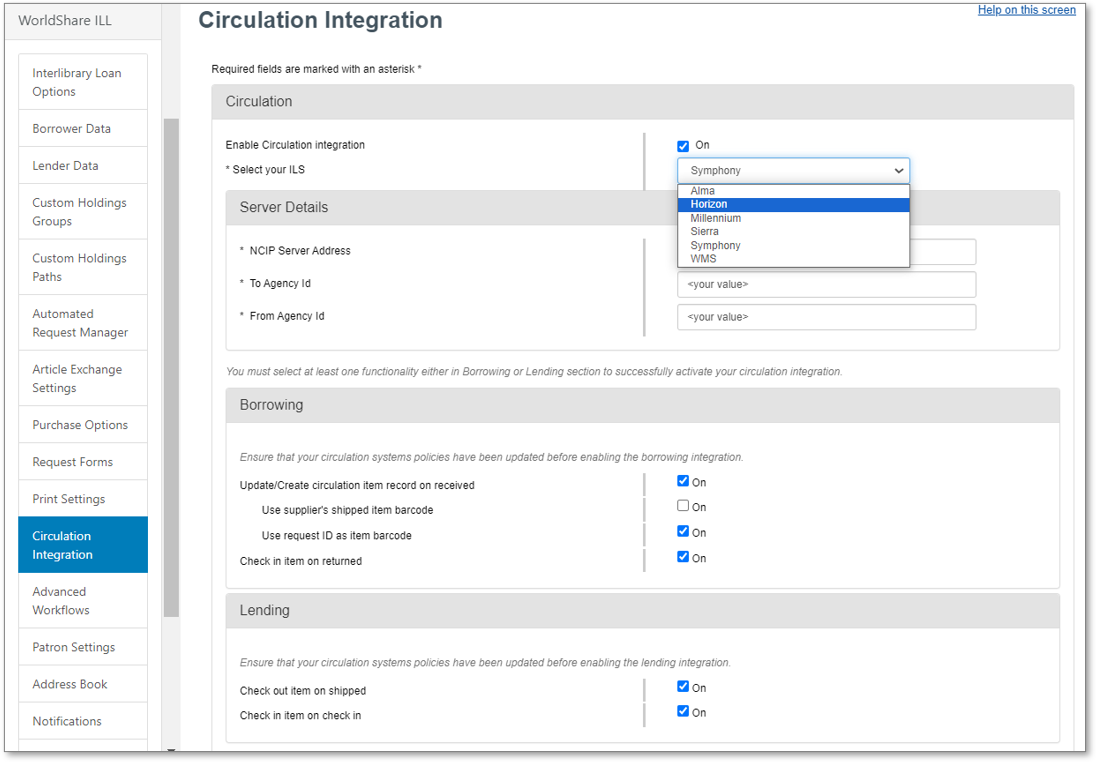
For more information, see Third-party Circulation integration.
Important links
Post-release session
To help you become familiar with the new features, enhancements, and improvements included in this release, please attend the upcoming webinar Product Insights: Resource Sharing.
Date: Thursday, October 26, 2:00 pm, Eastern Daylight Time (Eastern Daylight Time, UTC -04:00)
Registration: https://community.oclc.org/t5/resource-sharing-events/product-insights-resource-sharing/ec-p/44129#M4
Please note the session time zones when registering. The sessions will be recorded and archived for future viewing on the OCLC Community Center. Please register, even if you cannot attend, to receive a link to the recorded session.
OCLC Resource Sharing Conference web series
OCLC invites you to view recordings and slides in the community center from the 2023 OCLC Resource Sharing Conference (RSC23) web series. The free, virtual session from RSC23 included:
- Some changes are here to stay: Managing resource sharing in the 21st century | Recording and slides
- RSC23 Lightning sessions - Conducting interlibrary loan user surveys and Training student employees on ILL processing | Recording and slides
- Law, not guidelines: Moving beyond CONTU | Recording and slides
- Exceed your library users’ expectations with your ILL services | Recording and slides
- Lightning sessions- Resource sharing: an Italian perspective, Resource share the love, and Resource sharing trends survey | Recording and slides
- Workshop - Tips to improve staff workflows and users’ experience | Recording and slides
Virtual Workshop Series: Learn how to fine-tune your ILL setup
Were you able to join us for all of our Virtual Workshops where we showed how you can optimize your library’s ILL setup and workflows, and save time?
The series included the following topics:
- Part 1: Fine-tune your policies and deflections (recording, slides, and checklist available)
- Part 2: Construct your custom holdings (recording, slides, and checklist available)
- Part 3: Automate your request process (recording, slides, and checklist available)
- Part 4: Curate and care for your constant data (recording, slides, and checklist available)
- Part 5: Make your usage statistics count (recording, slides, and checklist available)
Support websites
Support information for this product and related products can be found at: