
WorldShare Circulation release notes, November 2023
Release Date: November 12, 2023
Introduction
This release of WorldShare Circulation provides new features and enhancements:
- Prevent holds on available items when the patron wants to pick up at the item's location
- Calculate long loan periods to elapse over open periods
- View the item branch associated with a patron's bill
- Specify the pickup location for a patron's borrowing request (PFL) when integrating with ZFL-Server
- Use branch-level International Standard Identifier for Libraries (ISILs) when integrating with ZFL-Server
- Bug fixes and performance improvements
Many of these enhancements are the direct result of your feedback.
Recommended actions
For this release, we recommend that you review the following checklists and complete the relevant tasks so that you can adjust your policies and workflows and train your staff. These checklists identify updates that we have determined as significant for most institutions. We encourage you to review all of the items in the release notes to determine whether there are other items that might require additional action or follow up by your institution.
Administrative actions
These items require immediate action or decisions.
| Azione |
|---|
|
Determine if your library will use the new Fulfil Holds By Item Status option in Collection Type Policy to prevent library staff from being asked to pull available items from the shelf when the patron wants to pick up at the item's location. You do not need to make any configuration changes if you want to continue using the system's current behavior. Before making any configuration changes to Collection Type Policy, you may wish to audit your pending hold requests to determine the impact on your users. Any policy changes will immediately impact holds in the queue. See below for more details about the new Available Item Cannot Be Picked Up At Its Home Branch option. |
|
Determine if your library would prefer long loan periods (calculated in days or weeks) to elapse over open periods only to support some in-house use workflows or other types of loans that should honor your library's open hours. You do not need to make any configuration changes if you want to continue using the system's current behavior. See below for details, including examples of loan period calculations for comparison. |
|
Determine if your library wants to specify a user's preferred pickup location for borrowing requests placed via ZFL-Server, an automated ILL service available to libraries in Germany, Austria, and Switzerland. You do not need to make any configuration changes if you want the system to continue to use the patron's home branch as the default pickup location for ZFL borrowing requests. See below for more details about how to add branch-level ISIL codes to the WorldCat Registry so that the integration can translate the ISIL values provided by ZFL into WMS pickup branches. You will also need to contact your ZFL-Server administrator to discuss support for including the AusgabeOrtNumerisch field in SLNPFLBestellung messages to WMS. |
New features and enhancements
Prevent holds on available items when the patron wants to pick up at the item's location
A new configuration option now allows your library to control if a combination of item availability and pickup location should be used to restrict hold requests and which items may appear on the pull list.
The new Available Item Cannot Be Picked Up At Its Home Branch option has been added to the Fulfil Holds By Item Status menu in Collection Type Policy to prevent your patrons from requesting available items for pickup at the item's holding location. Select this option if your library wants patrons to retrieve available items without assistance from library staff while still supporting hold requests if the patron wants to pick up the item at a different branch or if the item is currently on loan to a different patron, etc.
When this new option is selected, available items will never appear on the pull list to fulfill title or item-level holds when the pickup location is at the same branch where the available item is shelved. Title-level holds will remain in the queue until an eligible item is returned, checked in, or an item becomes available in another part of your collection.
You can apply this new policy option by any combination of item holding location, shelving location, and/or material format. At this time, patron type and patron home branch cannot be used to control this functionality.
Note: All existing options for hold fulfillment will continue to be supported with no changes in system behavior. You do not need to make any configuration changes if you wish to maintain the system's current functionality.
Configuration
If you would like to prevent pickup of available items at any pickup location at the item's holding location, select the new Available Item Cannot Be Picked Up At Its Home Branch option in the Fulfil Holds By Item Status menu in Collection Type Policy:
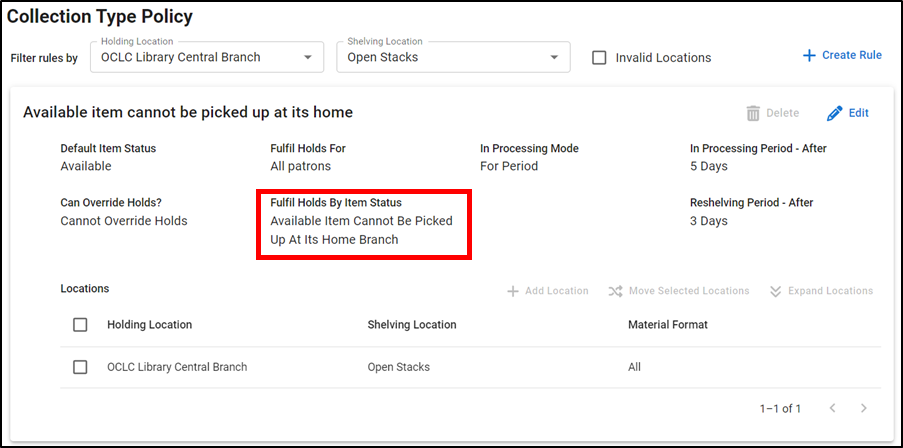
Your library now has four options for Fulfil Holds By Item Status behaviors:
| Fulfil Holds By Item Status | Descrizione |
|---|---|
| Any Item Status (Default) |
Items in any status may fulfill requests. Patrons can request any materials otherwise allowed by your policies. Any eligible item in this collection may appear on the pull list to fulfill pending requests. |
| Available Items Only |
Only Available items can fulfill requests. Patrons can only request a specific copy shelved in this collection if that copy is currently Available and is otherwise requestable. |
| Not Available Items Only |
Only items that are not Available can fulfill requests. Statuses that allow requests include: Unavailable, On Loan, On Hold, In Transit, Lost, Missing, etc. Patrons can only request a specific copy shelved in this collection if that copy is currently not Available and is otherwise requestable. If a patron has requested any copy of a title (i.e. a title-level hold), then available items will not appear on the pull list. |
|
Available Item Cannot Be Picked Up At Its Home Branch New! |
If an item is currently Available, then the item's holding location will not be a valid pickup option. If your library uses the Hold Pickup Locations Map, then pickup options will otherwise be limited to other location(s) that you have configured, if any. Patrons can only request a specific copy shelved in this collection if:
If a patron has requested any copy of a title (i.e. a title-level hold), then available items will not appear on the pull list if the hold's pickup location is the same as the item's holding location. |
Item-level holds & special requests
Based on your configuration, item-level (Specific Copies or Volumes) requests for barcoded materials will consider the status of the item when determining if a hold can be created. If the item's status conflicts with your policies, then no valid pickup options or only the valid subset of pickup options will be offered in WorldShare Circulation or WorldCat Discovery.
However, special requests and requests for specific, unbarcoded items will not use the Fulfil Holds by Item Status setting. A special request may be fulfilled with any item in the collection; the system cannot determine if an item is currently available or not. Similarly, unbarcoded items do not have a status in WMS to check against your policies. Instead, the item's holding and shelving location, material format, the requesting patron's borrower category, etc. will continue to be used to determine if the hold can be created based on the existing Fulfil Holds For setting in Collection Type Policy and your library's Hold Pickup Locations Map.
Title-level holds and circulation groups
Title-level requests will be allowed only if there is at least one eligible item in a requestable status when the request is created. Items in requestable statuses must also be allowed to fulfill holds based on the existing Fulfil Holds For setting in Collection Type Policy and your library's Hold Pickup Locations Map.
If you have only one copy, then that item's status will determine if a title-level (Any Copy) request can be created. If you have selected the new Available Item Cannot Be Picked Up At Its Home Branch option, then the selected pickup option must not be at the item's holding location. In general, no valid pickup options will be offered in WorldShare Circulation or WorldCat Discovery if the item's status conflicts with your policies.
If multiple copies are held by your library or circulation group, then a title-level hold is only allowed when at least one item is 1) in a requestable status and 2) is requestable according to Collection Type Policy and the Hold Pickup Locations Map. Valid pickup options will appear if at least one eligible item is detected.
Pull list and hold fulfillment
Items will only appear on the pull list at your branch if Collection Type Policy allows fulfillment according to the following Fulfil Holds by Item Status options:
- Any Item Status (Default)
- Available Items Only
- Available Item Cannot Be Picked Up At Its Home Branch when your location is not the pickup location
In general, you will still need to check the pull list if your library allows special requests or processes item-level requests for unbarcoded materials.
Item status restrictions will not apply when checking in an item. Therefore, you can use check in to bypass your Fulfil Holds By Item Status policies, when needed. For example, checking in an item that was On Loan will fulfill a pending hold even if the item's policy fulfills holds for Available Items Only and another, available copy hasn't been pulled yet. Likewise, an available item will not appear on the pull list if your policy fulfills holds for Not Available Items Only but, if you choose to pull the material, checking it in will trigger the system to check for any pending holds.
Examples of library staff and patron experiences
| Fulfil Holds By Item Status setting | Current status of the item in the collection |
Create a title-level or group-level request? |
Create an item-level request for a barcoded item? |
Create a special request or item-level request for unbarcoded item? |
Item may appear on the pull list? | Checking in the item may fulfill an existing hold? |
|---|---|---|---|---|---|---|
| Not Available Items Only | Available |
Only if there is at least one item that could currently fulfill request. |
No |
Sì |
No |
Sì |
| Any other status | Sì |
No |
||||
| Any Item Status (Default) | Available | Sì | Sì | |||
| Any other status | Sì | No | ||||
| Available Items Only | Available | Sì | Sì | |||
| Any other status | No | No | ||||
|
Available Item Cannot Be Picked Up At Its Home Branch New! |
Available | Yes - Pickup location cannot be at the item's holding location | Yes - Only if the pickup location is not your branch | |||
| Any other status | Sì | No |
Other considerations
Caution: Any policy changes that your library makes will impact all hold requests that are already pending fulfillment in WorldShare Circulation. You may wish to use the Pickup Location or Holds for Review reports to identify requests that may be negatively impacted by a policy change.
If you would like to enable the new Available Item Cannot Be Picked Up At Its Home Branch option, you may also wish to review your library's Hold Pickup Locations Map to review any restrictions you may have made on pickup options based on item location.
If your library integrates with an interlibrary loan system, be sure to configure the Any Item Status (Default) setting for the shelving location where temporary items are created for borrowing requests.
Be advised that the automatic renewal process and manual recalls from WorldCat Discovery will not recall on-loan items to fulfill a pending hold request if the item's Collection Type Policy is configured to fulfill holds for Available Items Only.
Calculate long loan periods to elapse over open periods
You can now control if long loan periods measured in days or weeks should elapse only over periods that your library is open. You may want to use this calculation option for some in-house use workflows or other types of loans that should honor your library's open hours.
If your library supports this type of loan, allowing the system to automatically calculate these loan periods will reduce how often you may need to manually select due dates at checkout and allow your library to increase the usage of self-checkout machines or mobile apps to make the checkout and renewal process more efficient for patrons and library staff.
You do not need to make any configuration changes if you want to continue using the system's current behavior. By default, long loan periods will continue to elapse over calendar days with automatic adjustments to ensure materials are not due on a day that you are closed.
Note: Regardless of your choice, the system will continue to automatically limit long loan periods. A limit may force a loan to be due when your library is closed. Any of these limits may force an item to be due on a day that your library is closed:
- The patron's expiration date
- A future fixed due date that is specified in your loan policy
- A due date specified by an interlibrary loan system
- A due date that is mandated by the offline client or a third-party service using the WMS SIP2 Service or NCIP APIs
Configure long loan behavior in a Loan Policy
Use the new Include closed days in loan period? setting in your Loan Policies. Select Yes to continue calculating long loan periods over elapsed calendar days. Select No to calculate long long periods to only elapse over days when your library is open.
All existing loan policies will have Yes selected by default to match the system's current behavior.
Your loan period must be calculated in days or weeks for this option to appear:
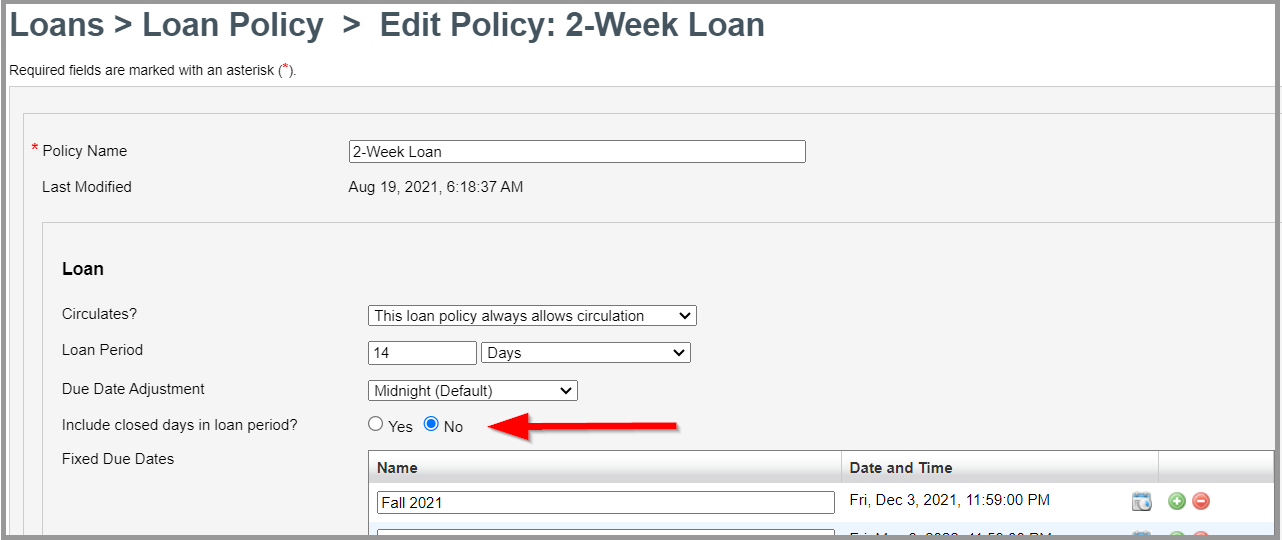
Your choice will be applied automatically at checkout and when an item is renewed by your library staff, the patron, or automatic renewal.
For open hours to be honored during at renewal as well as checkout, the renewal period must also be measured in days or weeks For example, if the loan period three months, then renewal periods of five days will not honor your open hours.
Open hours
The open hours of the item's holding location will continue to be honored when calculating due dates and overdue penalties if that branch's open hours are configured to override your institution's open hours. Otherwise, your institution's open hours will be used. See Branch Opening Hours Override Settings for more details.
If your library uses group circulation, the relevant open hours of the item's home library or holding location will continue to be used.
Special open hours can be configured to temporarily replace your library's regular hours. For example, you can use special hours to reflect that your library will open later than usual during exam week or will be closed for a holiday.
See Open Hours to learn more about configuring normal and special hours.
Other adjustments and limits to loan periods
Due date calculations will continue to honor any other limits or adjustments on long loan periods.
For example, loan due dates will be limited to the patron's expiration date, fixed due dates set in the Loan Policy, and due dates provided by an interlibrary loan system. Also, the Due Date Adjustment options in Loan Policy will continue to allow you to choose if long loans should be due at midnight (23:59:59) or at closing time on the calculated day.
Loans can never be due after a patron's account has expired. Be sure to update patron expiration dates on a regular schedule, if necessary, to prevent truncated loans, automatic renewal failures, etc.
Fixed due dates in loan policies can be used to end loans at the end of an academic term, the calendar year, or any other term that's relevant for your community. Once the fixed date has passed, existing loans will be allowed to be renewed to the next fixed date. We recommend configuring fixed due dates 10-12 months in advance, where possible.
Note: The limits and adjustments mentioned above may force an item to be due on a day that your library is closed.
Returning loans, overdue penalties, and email notifications
Before making changes to your long loan policies, consider how changes in due dates and times might impact how overdue penalties or grace periods are calculated and when overdue notifications are sent to your patrons.
You may also need to consider how your library checks in items that are returned while your library is closed, especially if the check-ins are done manually when the library opens. Should those check-ins be backdated as if they occurred at your last closing time, midnight the previous night, etc.? Is your grace period still accurate?
If your library provides checkout receipts or overdue reminder emails, you may wish to review the language that you use to describe when an item will be due.
Existing / active loans
The due date and time of items already on loan will not be adjusted based on any changes you may make to your loan policies. Instead, any new adjustments will be honored the next time an item is renewed or checked out under the updated policy.
If you would like to update your existing loans, consider using the bulk renewal client and enabling automatic due date receipt emails to ensure that your patrons are aware of their new due dates.
Example due date calculations
Not sure which configuration is right for your library?
View the item branch associated with a patron's bill
You can now view the current holding location assigned to a billed item when viewing the Bills tab in a patron's account.
If your library limits where payment can be taken by library staff, viewing item location information will make it easier to determine if your branch can collect payment for a bill without having to click to view the item record.
The new Item Branch column has been added to the Account of unresolved bills as well as the Account History table of resolved bills. The new column will be disabled by default. To view this column, click the settings icon and select Item Branch from the Show Columns menu:
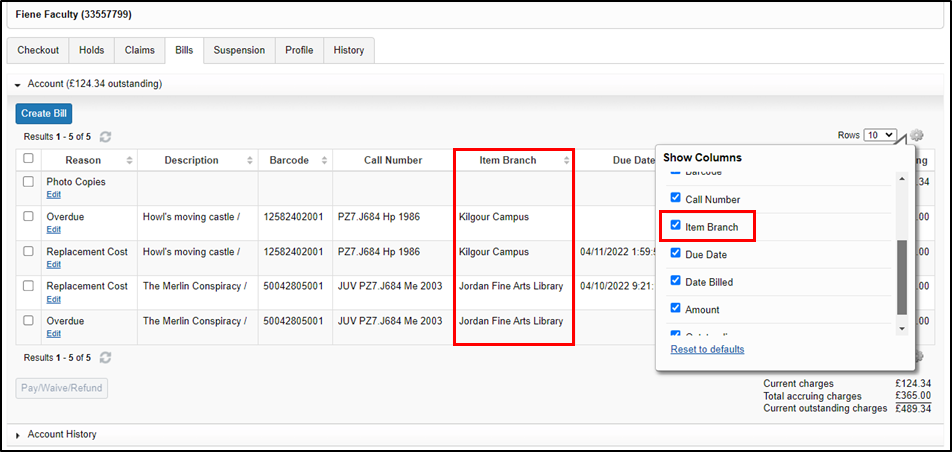
The Item Branch column will not be populated if a bill is not associated with an item or if the item has been withdrawn and purged according to your Deleted Items policy.
The Item Branch column will display the current holding location of an item; not where the item was shelved when the bill was created.
Specify the pickup location for a patron's borrowing request (PFL) when integrating with ZFL-Server
WorldShare Circulation's integration with ZFL-Server now supports the AusgabeOrtNumerisch field for specifying a pickup location for a patron's borrowing (PFL) request. The pickup location is usually selected by the patron in the request form provided by the ZFL gateway.
If a pickup location is not specified in the SLNPFLBestellung message, WMS will continue to use the requesting patron's home branch as the pickup location.
At this time, WMS accepts only branch-level International Standard Identifier for Libraries (ISIL) codes in the AusgabeOrtNumerisch field. To use this feature, you will first need to add your branch-level ISILs to the WorldCat Registry:
- Log into Service Configuration with your OCLC symbol.
-
In the left navigation menu, click on WorldCat Registry > Relationships.
- Click on the link for the branch location you want to update.
-
In the dialog box, click on Select and Edit this record in upper right corner. Your Service Configuration session is now pointed at the branch you selected.
-
In the left navigation menu, click on Identifiers.
-
Select ISIL from the Identifier Type menu.
-
Enter your branch's ISIL code in the Identifier entry box.
-
Fare clic su Salva.
-
To add an ISIL to another branch, click Relationships in the left navigation menu
-
Click on the link for your institution's name.
-
In the dialog box, click on Select and Edit this record in upper right corner. Your Service Configuration session is now pointed at your institution.
-
Repeat steps #2 - #10 until you have added an ISIL to all the branches that will serve as pickup options for your patrons.
Alternatively, if you know the WorldCat Registry ID for your branch, you can go straight to the branch details in Service Configuration by searching for that ID number in the Select an Institution dropdown list instead of navigating through the Relationships menu.
Other than adding branch-level ISILs to your Registry records, no additional configuration is needed for WorldShare Circulation to honor pickup locations provided by ZFL-Server. Contact your ZFL-Server administrator to discuss support for including the AusgabeOrtNumerisch field in SLNPFLBestellung messages to WMS.
Use branch-level International Standard Identifier for Libraries (ISILs) when integrating with ZFL-Server
WorldShare Circulation's integration with ZFL-Server can now identify your institution by institution-level or branch-level International Standard Identifier for Libraries (ISIL) codes.
Currently, Circulation identifies the target institution of a ZFL request by institution-level ISIL only. Branch-level ISIL support is required if your ZFL-Server implementation is configured to broker requests to your individual branches in your WMS implementation.
After this release, Circulation will automatically detect if the target ISIL provided by ZFL-Server is a WMS institution or branch and will process the request accordingly. Similarly, Circulation will send messages back to ZFL using the ISIL that ZFL-Server provided in the initiating message.
For example, if ZFL specifies Branch A's ISIL when creating a patron borrowing request (i.e. SLNPFLBestellung message), then WMS will create the temporary item and patron hold for Branch A's parent institution. Later in the workflow when the patron has returned the item, Circulation will provide Branch A's ISIL when notifying ZFL that the item has been returned to the lending library (i.e. SLNPInfo2FLServer Return message).
Note: ZFL request processing in WMS will not change if the ISIL provided by ZFL is at the branch or institution level. For example, if an lending (AFL) request is submitted to Branch A, items from any of your library's branches will be allowed to fulfill the request according to your circulation policies.
To use this feature, you must add your branch-level ISILs to the WorldCat Registry. See the instructions for configuring branch-level identifiers above for more details.
Caution: Verify that your institution's OCLC symbol is not included in the list of identifiers in your branch-level Registry records. ZFL integration will fail if your OCLC symbol is an identifier at the branch level.
Otherwise, no additional configuration is needed for WorldShare Circulation to honor branch-level ISILs.
Bug fixes
Staff without permission to create new user accounts can open the new user form
Prior to this release, library staff without permission to create new user accounts were able to see the Create New Patron button in Circulation. The staff user could fill out the new user form but could not save their changes.
As of this release, users that are not allowed to create new user accounts will no longer see the Create New Patron button in Circulation.
See Circulation account roles for more information about roles that are granted permission to manage user records.
Known issues
See the Known Issues page.
Important links
Support website(s)
Support information for this product and related products can be found at: