
Tipasa release notes, December 2021
Release Date: December 12, 2021
Introduzione
This release of Tipasa provides a new enhancement in addition to numerous bug fixes. These features will help you manage more complex workflows, including:
Recommended actions
For this release, we recommend that you review the following checklists and complete the relevant tasks so that you can adjust your policies and workflows and train your staff. These checklists identify updates that we have determined as significant for most institutions. We encourage you to review all of the items in the release notes to determine whether there are other items that might require additional action or follow up by your institution.
Administrative actions
These items require immediate action or decisions.
| Azione |
|---|
|
For best performance, it's very important to clear your browser's cache before starting to work with Tipasa! |
|
Be sure to utilize Smart fulfillment functionality, including: |
|
If your library uses WorldShare Management Services (WMS), we encourage you to verify that your integrations with WorldShare Circulation and WorldShare Acquisitions are set up to best meet your needs. https://help-it.oclc.org/Resource_Sharing/Tipasa/WorldShare_Circulation_Integration https://help-it.oclc.org/Resource_Sharing/Tipasa/WorldShare_Acquisitions_integration Note: Local holdings and availability (OPAC) integration has been turned on for all WMS libraries. |
|
If your library uses Ex Libris Alma, we encourage you to enable OPAC integration for automatic retrieval of local holdings and availability information and circulation integration for automatic creation of temporary items and automated checkout/check-in. Please contact OCLC Support to request these be enabled. |
|
If your library uses Innovative's Sierra, we encourage you to enable OPAC integration for automatic retrieval of local holdings and availability information. Please contact OCLC Support to request these be enabled. |
|
For all other library systems, if the link to your library’s catalog has not been set up or if the link needs to be updated, follow the instructions below. When you have enabled your online catalog links, you can quickly search your catalog for requested items as a borrower or lender. https://help-it.oclc.org/Resource_Sharing/Tipasa/Reference/Search_my_library's_online_catalog |
| Have you updated addresses within each of your borrower and lender Constant Data records in OCLC Service Configuration? If not, please do so on behalf of all your borrowing and lending partners. Address labels do not print properly unless the addresses are formatted correctly. |
|
Have your contact information or lending policies changed? If so, please make the appropriate updates in OCLC Policies Directory. |
|
Don't forget to utilize the reporting capabilities for Tipasa in WorldShare Report Designer. An overview recording is available in the OCLC Community Center: https://www.oclc.org/community/ill_prime/events/analytics.en.html |
Follow-up actions
In an effort to keep your staff informed of new features and changes, you may also want to consider these items.
| Azione |
|---|
|
Share these release notes with your colleagues. |
|
During the COVID-19 crisis, review the information summarized in this News post:
Vedi anche: |
|
Have you signed up for email alerts for News in the Community Center? This ensures that Tipasa release notes and events come straight to your inbox. |
New features and enhancements
Utilize local date formats in notifications
Based on the country of the recipient, data formats in notifications are now formatted in the recipient’s date format standard to help avoid confusion. For users in the United States, there will be no change and the format will continue to be in the Month/Day/Year format. In contrast, for example, recipients in Australia and the United Kingdom will now see the format as Day/Month/Year.
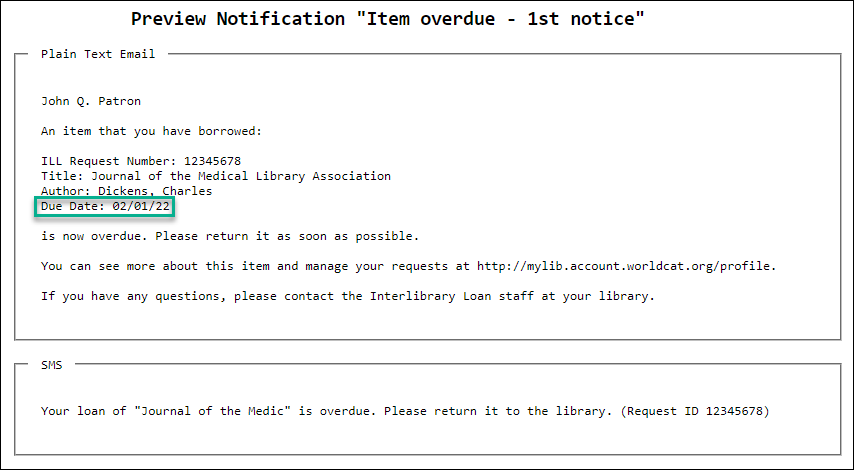
For notifications from the borrowing library to the patron or from the document delivery library to the patron, the standard date format for the patron's country will be used. If the patron's home country cannot be determined, the US standard will be the default.
For notifications from the borrowing library to the lending library, the standard date format for the lending library's country will be used.
Custom notifications will display the date in the format of the recipient’s country. If at any time the proper format for the recipient cannot be determined by the system, the system will default to the US standard of Month/Day/Year.
Because the recipient of the Full Request Details email can't be assumed by the system, the dates will always appear in the standard format of the sender's country.
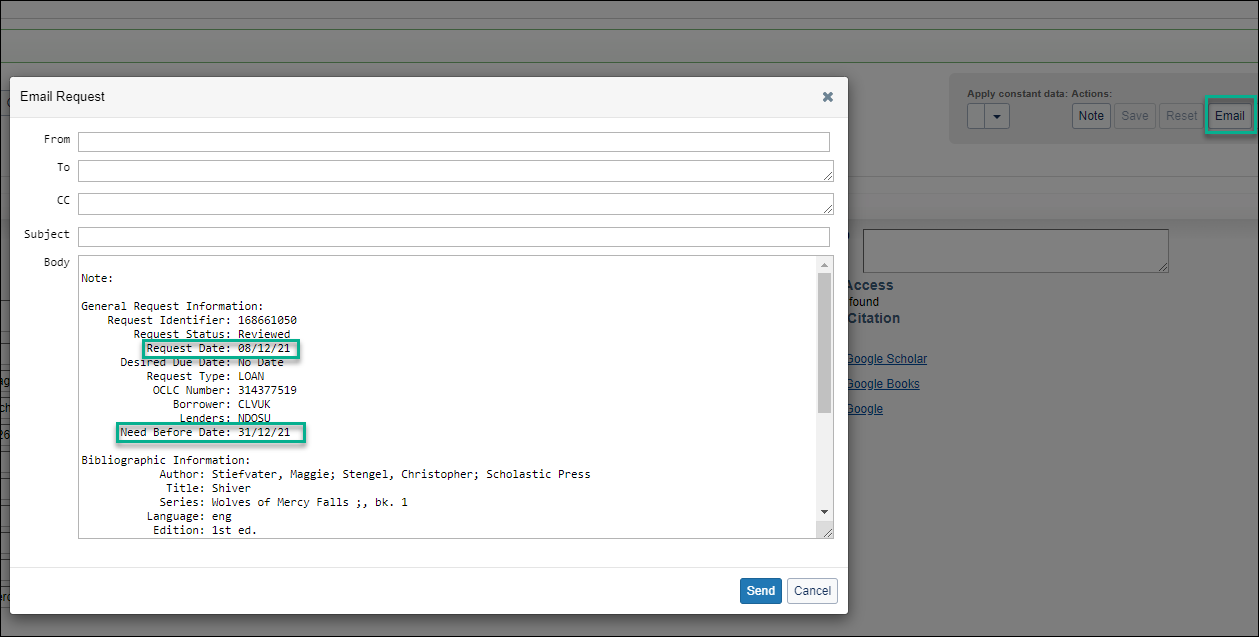
The following notification data inserts will reflect this update:
- ${CreateDate!}
- ${DueDate!}
- ${NeedBeforeDate!}
- ${PatronDueDate!}
- ${SupplierShippedDate!}
Please note that dates from the bibliographic information of the request, such as issue date, will not be affected. This change is automatic and does not require configuration or setup.
Bug fixes
System insterted patron notes, such as MC: and NB: are no longer considered when an automation has an "Any Patron Note" match criteria.
Known issues
Important links
Product Insights: Resource Sharing
To help you become familiar with the enhancements and fixes included in this release, please attend the upcoming webinar Product Insights: Resource Sharing.
Date: Wednesday, February 2nd, 2:00pm, Eastern Daylight Time (New York, UTC -04:00)
Registration: https://www.oclc.org/community/ill_prime/events/february-2022.en.html
Please note the session time zone when registering. The sessions will be recorded and archived for future viewing on the OCLC Community Center. Please register, even if you are unable to attend, to receive a link to the recorded session.
OCLC Resource Sharing Conference (RSC21) web series
OCLC invites you to view the recordings of the presentations from the 2021 OCLC Resource Sharing Conference web series. This year’s series of six free, virtual sessions featured electronic document delivery, controlled digital lending, and moving resource sharing forward during this challenging time.
RSC21 included these sessions:
- Tuesday, March 30, 1:00-2:30 pm | “Page, scan, send, reshelve: A mobile scanning station for ILL electronic document delivery service”
- Wednesday, April 28, 11:00 am-12:30 pm | “ILL and the pandemic: Learning from the unexpected”
- Wednesday, May 12, 1:00-2:30 pm | “Renewing resource sharing in challenging times: Collaborating to meet library user needs and demonstrating the value of ILL services”
- Tuesday, May 25, 1:00-2:30 pm | “Managing resource sharing during COVID-19 pandemic: Experiences and impacts—three perspectives”
- Thursday, June 10, 1:00-2:30 pm | “Controlled digital lending in two private academic libraries: Same services with diverse tools”
- Tuesday, June 15, 11:00 am-12:30 pm | “A look at ILL into the future: An update on your ILL services”
Recordings of these 60 minute presentations are available here.
Virtual Workshop Series: Learn how to fine-tune your ILL setup
The series included the following topics:
- Part 1: Fine-tune your policies and deflections (recording, slides, and checklist available)
- Part 2: Construct your custom holdings (recording, slides, and checklist available)
- Part 3: Automate your request process (recording, slides, and checklist available)
- Part 4: Curate and care for your constant data (recording, slides, and checklist available)
- Part 5: Make your usage statistics count (recording, slides, and checklist available)
Support websites
Support information for this product and related products can be found at: