
My Account release notes, March 2021
Release Date: March 10, 2021
Introduzione
This release of My Account provides two enhancements. These features will help you manage more complex workflows, including:
- Enhance your users' experience with a floating chat button
- Include links and formatting in ILL patron request forms to better communicate with users (for Tipasa libraries)
These enhancements are the direct result of your feedback.
Recommended actions
For this release, we recommend that you review the following checklists and complete the relevant tasks so that you can adjust your policies and workflows and train your staff. These checklists identify updates that we have determined as significant for most institutions. We encourage you to review all of the items in the release notes to determine whether there are other items that might require additional action or follow up by your institution.
Administrative actions
These items require immediate action or decisions.
| Azione |
|---|
|
If your library uses both Tipasa and WorldShare Management Services (WMS), we encourage you to verify that your integration is set up to best meet your needs. For details, see Set up integration. With questions or for assistance with setup, contact OCLC Support. |
Follow-up actions
In an effort to keep your staff informed of new features and changes, you may also want to consider these items.
| Azione |
|---|
|
Share these release notes with your colleagues. |
|
Have you signed up for email alerts for News in the Community Center? This ensures that release notes and events come straight to your inbox. |
Include Request ID with problem reports
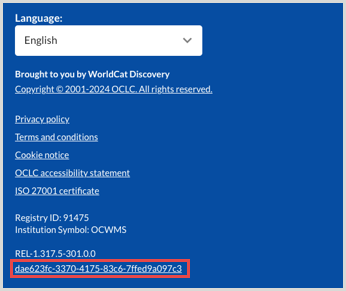
When reporting an issue with My Account or WorldCat Discovery, it's very helpful to include the Request ID. It can be found at the bottom of the screen on which the issue occurred. Including this information allows us to directly trace what happened on the request we are troubleshooting.
New features and enhancements
Enhance your users' experience with a floating chat button
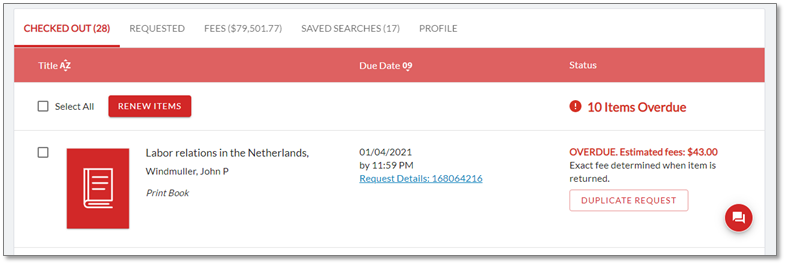
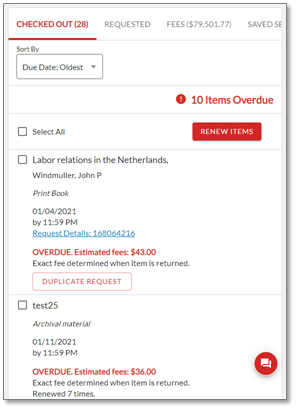
Virtual reference or "chat" services help your library users connect to reference services wherever they are. A floating chat button is now available for library users in the My Account interface—making My Account more customer friendly and enhancing your users’ experience.
If the chat option is configured for your institution in OCLC Service Configuration, the floating button will remain visible in the lower right corner of the My Account screen as the user scrolls within the page.
Desktop view
Mobile view
For libraries with WorldCat Discovery
The chat option is currently available in WorldCat Discovery, and the new style floating button is included in the modernized WorldCat Discovery interface.
If your library has configured the chat option, your users will see the traditional chat option in the current WorldCat Discovery interface and the new floating chat option in My Account. When you transition to the modernized interface later this year, users will see the floating chat button in both WorldCat Discovery and My Account.
For libraries with Tipasa
If the chat option was previously configured for the former user portal, your users will begin seeing the new floating chat button with this release.
Configuring the chat option
If chat was previously configured for your library, you may want to check your configurations and make any needed updates. These same steps can be used if you are starting a new chat configuration.
- In OCLC Service Configuration, navigate to WorldCat Discovery and WorldCat Local > User Interface Options > Custom Links.
- Under Custom link 1, select the following options:
Link type: library contact info
Display Chat Widget: Yes
Do you have a QuestionPoint account?: No
Chat code: Enter the custom code for your library’s chat or virtual reference service.
(Optional) Display text: Enter text to display when users mouse over the floating button. If blank, the default text “Chat with Librarian” will display.
(Optional) Add Translation: Specify translations for Display text.
- Click Save Changes.
Removing chat from the Resources menu
When the new My Account was released in June 2020, it did not include the chat option that was available in the former user portal. If you chose to add a chat option to the Resources menu at that time, you may now want to remove it from that menu.
For more information, see Custom Links or Tipasa release notes for My Account, June 2020.
Include links and formatting in ILL patron request forms to better communicate with users
For libraries with Tipasa
Links and basic HTML formatting can now be included in selected fields within Patron Request Workforms, making it easier to communicate information to users within the forms. With this change, you can now include bold, italic, and underlined text as well as paragraph returns. For example:
<p">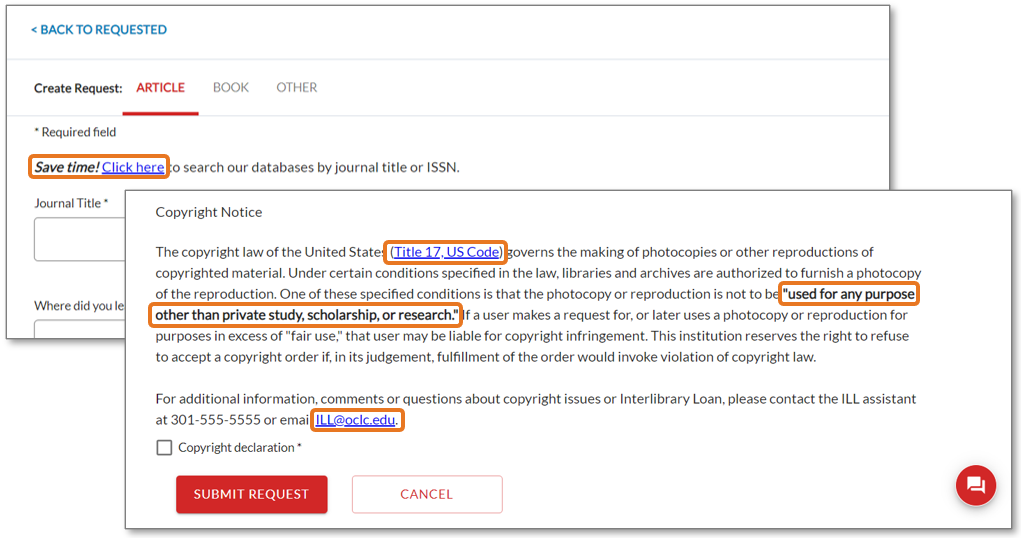
.
These fields in patron request forms now allow basic formatting:
- Intestazione della sezione
- Dichiarazione di copyright
- Nota
- Nota per il cliente
I tag di formattazione consentiti sono:
- Tag di collegamento: <a></a>
- Tag in grassetto: <b></b>
- Tag italico: <i></i>
- Tag di sottolineatura: <u></u>
- Tag del paragrafo: <p></p>
Note: Any other HTML or JavaScript codes will be stripped and will not display on the form.
To edit one or more of these fields on your library's forms, go to OCLC Service Configuration and navigate to WorldShare ILL > Patron Request Workforms. Open the accordion for the form you'd like to edit and enter the desired text, links, or other allowed HTML tags in the field. For example:
|
|
|
|

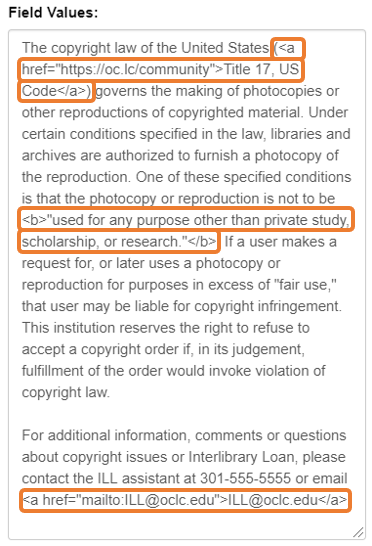
For more information, see Patron Request Workforms.
Nota
Internet Explorer 11 support ends in August 2021
Please note that support for Internet Explorer 11 (IE 11) ends on August 2, 2021. Some features in IE 11 will continue to work, but issues will not be fixed. Contact OCLC Support as soon as possible if this poses any concern for your institution.
Known issues
For a full list of current and recently fixed issues, see Known issues.
Important links
Post-release sessions
To help you become familiar with the new features, enhancements and improvements included in this release, update sessions scheduled. Please note the session time zones when registering. The sessions will be recorded and archived for future viewing on the OCLC Community Center. Please register, even if you are unable to attend, to receive a link to the recorded session.
- WorldCat Discovery
- Product Insights: WorldCat Discovery
- Date: Thursday, March 4, 2021, 11:00 am EST
- Register Now
- Servizi di gestione WorldShare
- Product Insights: WMS
- Date: Tuesday, March 16, 2021, 1:00 pm EST
- Register Now
- Tipasa
- Product Insights: Resource Sharing
- Date: Wednesday, April 21, 2021, 2:00 pm EST
- Register Now
Support websites
Support information for this product and related products can be found at: