
My Account release notes, April 2021
Release Date: April 28, 2021
Introduzione
This release of My Account provides new features and enhancements in addition to a bug fix. These features will help you manage more complex workflows, including:
- Provide library users with skip navigation and improved tabbing for increased accessibility
- Provide library users with new default cover art and message display for improved usability
- Automatically hide WorldCat Discovery features to provide your users with a more consistent discovery experience
Many of these enhancements are the direct result of your feedback.
Recommended actions
For this release, we recommend that you review the following checklists and complete the relevant tasks so that you can adjust your policies and workflows and train your staff. These checklists identify updates that we have determined as significant for most institutions. We encourage you to review all of the items in the release notes to determine whether there are other items that might require additional action or follow up by your institution.
Administrative actions
These items require immediate action or decisions.
| Azione |
|---|
|
If your library uses both Tipasa and WorldShare Management Services (WMS), we encourage you to verify that your integration is set up to best meet your needs. For details, see Set up integration. With questions or for assistance with setup, contact OCLC Support. |
Follow-up actions
In an effort to keep your staff informed of new features and changes, you may also want to consider these items.
| Azione |
|---|
|
Share these release notes with your colleagues. |
|
Have you signed up for email alerts for News in the Community Center? This ensures that release notes and events come straight to your inbox. |
Include Request ID with problem reports
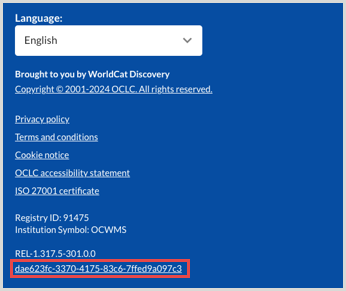
When reporting an issue with My Account or WorldCat Discovery, it's very helpful to include the Request ID. It can be found at the bottom of the screen on which the issue occurred. Including this information allows us to directly trace what happened on the request we are troubleshooting.
New features and enhancements
Provide library users with skip navigation and improved tabbing for increased accessibility
Skip navigation
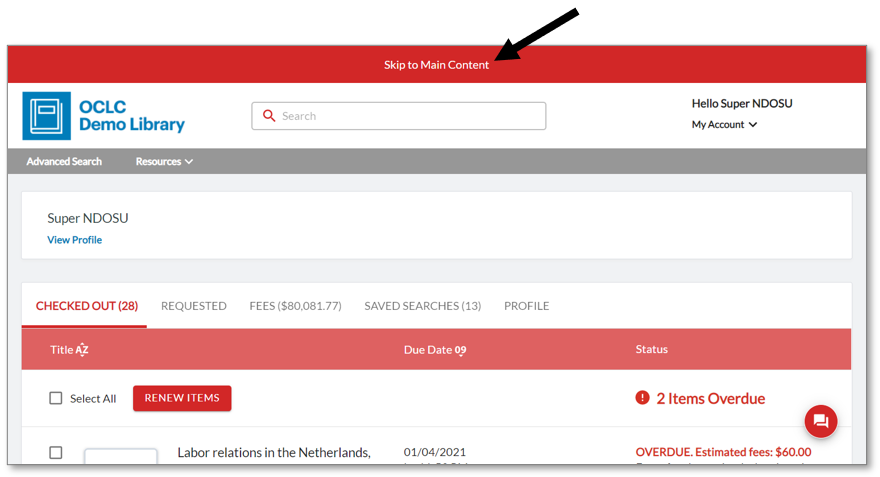
Navigation has been improved to assist screen reader users and users navigating by keyboard with more quickly navigating the My Account page. When the browser focus is at the top of the page, the user now can press the Tab button once to expose the "Skip to Main Content" option or press the Tab button twice to expose the "Skip to Footer" option. Pressing Return moves the browser focus to the corresponding section of the page.
This screen shows the skip option when the user has clicked the Tab button once:
Accessible tabbing
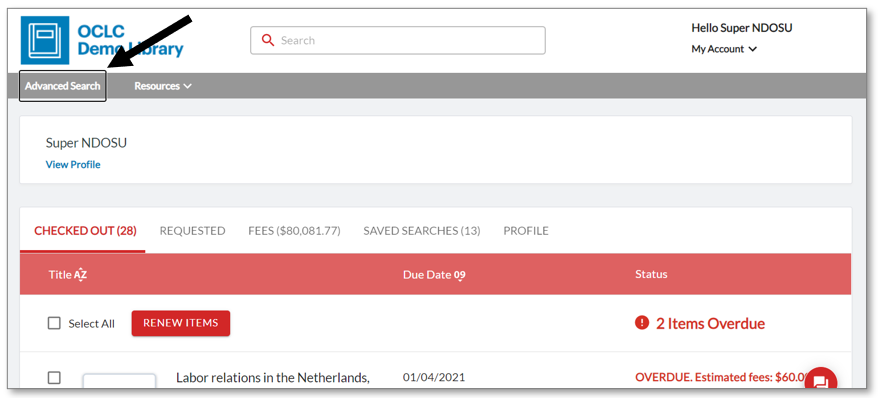
Previously, the browser focus was indicated with a colored ripple effect, which was not visible to color blind users. It has been replaced with the browser's default focus effect, shown here in Chrome for example.
Provide library users with new default cover art and message display for improved usability
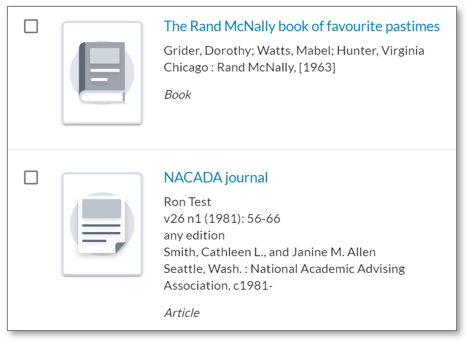
Less prominent cover art
The previous default cover art icons have now been replaced with more subtle designs. Examples when the secondary color selection is white:
Outlined message boxes
The previous solid-colored error and confirmation message boxes have been replaced with an outlined design.


Automatically hide WorldCat Discovery features to provide your users with a more consistent discovery experience
For libraries that subscribe to WorldCat Discovery or FirstSearch
With WorldCat Discovery or FirstSearch, your library's users are provided with several access points from My Account to WorldCat Discovery. If your library also subscribes to another discovery service, and positions that service on your web site as the primary or preferred service, these access points for WorldCat Discovery may cause confusion or lead users to pages that aren't fully configured for their use.
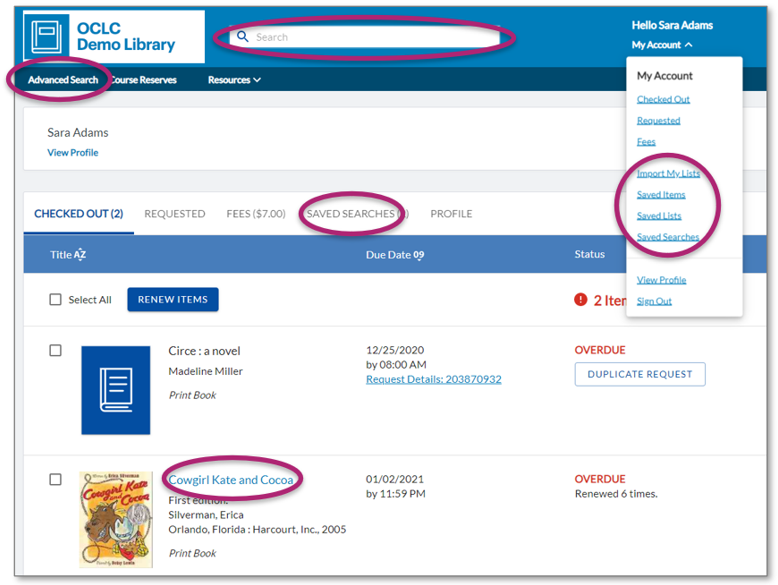
You now have the option to hide the WorldCat Discovery access points within My Account. These include:
- Casella di ricerca
- Ricerca avanzata
- Saved Searches tab (saved search results)
- Navigazione verso elenchi, elementi e ricerche salvati
- Il titolo rimanda ai dettagli in WorldCat Discovery
With the access points enabled, your users see the circled features:
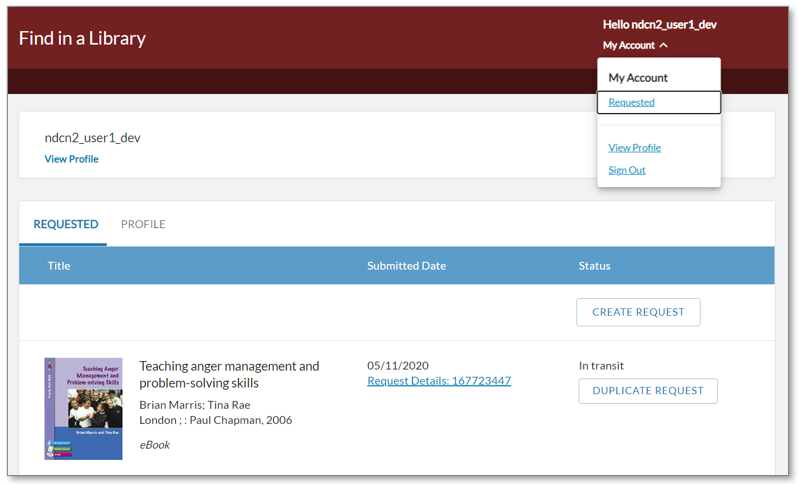
With the access points disabled, they are not available to your users. For example, this screenshot shows Tipasa features only:
To request that the WorldCat Discovery access points be disabled, please contact OCLC Support. The change will be hard-coded for your library, and the access points will become unavailable to your users with the next planned My Account release.
If you decide in the future to re-enable the WorldCat Discovery access points, simply contact OCLC Support to request they be made available for your patrons.
Nota
Internet Explorer 11 support ends in August 2021
Please note that support for Internet Explorer 11 (IE 11) ends in August 2021. Some features in IE 11 will continue to work, but issues will not be fixed. Contact OCLC Support as soon as possible if this poses any concern for your institution.
Bug fix
Circulation staff hold note is removed
For libraries with WorldShare Circulation
When a patron edited (within My Account) the note for a circulation hold, a bug was causing content in the Staff Note field in WorldShare Circulation to be deleted.
As of this release, the Staff Note value will no longer be deleted when a patron edits the note for a hold. Any changes that the patron may make to the public hold note will continue to be honored by WMS.
Known issues
For a full list of current and recently fixed issues, see Known issues for My Account.
Important links
Post-release sessions
To help you become familiar with the new features, enhancements and improvements included in this release, update sessions scheduled. Please note the session time zones when registering. The sessions will be recorded and archived for future viewing on the OCLC Community Center. Please register, even if you are unable to attend, to receive a link to the recorded session.
-
- Product Insights: WorldCat Discovery
- Date: Thursday, May 26, 2021, 12:00 pm EST
- Register Now
- Circolazione WorldShare
- Product Insights: WorldShare Management Services
- Date: Tuesday, June 15, 2021, 1:00 pm EST
- Register Now
- Tipasa
- Product Insights: Resource Sharing
- Date: Tuesday, July 13, 2021, 2:00 pm EST
- Register Now
Support websites
Support information for this product and related products can be found at: