
My Account release notes, May 2021
Release Date: May 21, 2021
Introduzione
This release of My Account provides new features and enhancements to help you offer an improved experience for your library's users, including:
- Provide library users with an improved user interface for creating ILL requests
- Offer improved placement of magnifying glass icon in search box
Many features and enhancements are the direct result of your feedback.
Recommended actions
For this release, we recommend that you review the following checklists and complete the relevant tasks so that you can adjust your policies and workflows and train your staff. These checklists identify updates that we have determined as significant for most institutions. We encourage you to review all of the items in the release notes to determine whether there are other items that might require additional action or follow up by your institution.
Administrative actions
These items require immediate action or decisions.
| Azione |
|---|
|
If your library uses both Tipasa and WorldShare Management Services (WMS), we encourage you to verify that your integration is set up to best meet your needs. For details, see Set up integration. With questions or for assistance with setup, contact OCLC Support. |
Follow-up actions
In an effort to keep your staff informed of new features and changes, you may also want to consider these items.
| Azione |
|---|
|
Share these release notes with your colleagues. |
|
Have you signed up for email alerts for News in the Community Center? This ensures that release notes and events come straight to your inbox. |
Include Request ID with problem reports
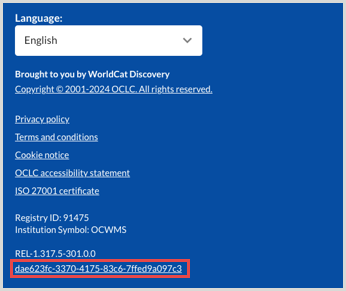
When reporting an issue with My Account or WorldCat Discovery, it's very helpful to include the Request ID. It can be found at the bottom of the screen on which the issue occurred. Including this information allows us to directly trace what happened on the request we are troubleshooting.
New features and enhancements
Provide library users with an improved user interface for creating ILL requests
For libraries with Tipasa
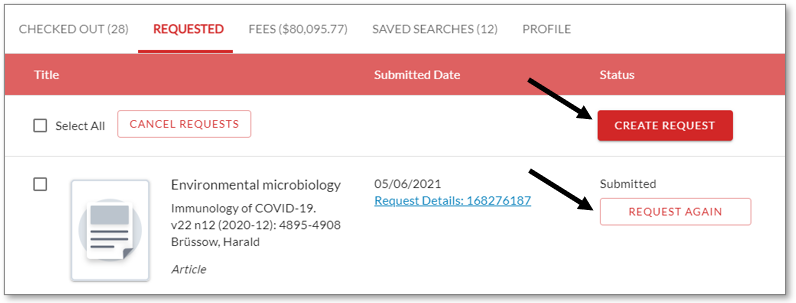
More prominent Create Request button on the Requested tab
Previously, the Create Request button displayed as a secondary button, similar to Cancel Requests. Create Request now displays as a primary button, which will make it easier for users to locate for accessing a blank ILL form.
More intuitive Request Again button on Requested tab
Previously, the purpose of the Duplicate Request button was not necessarily clear. It has been relabeled as Request Again to better indicate the initiation of a new similar request.
Clicking the Request Again button invokes the ILL request form with the appropriate fields automatically prefilled. The user may submit the request as-is or edit the fields before submitting the form.
For more information, see Requested.
Offer improved placement of magnifying glass icon in search box
For libraries with WorldCat Discovery
Previously, the magnifying glass icon appeared at the left side of the WorldCat Discover search box within the My Account banner. It has been relocated to the more standard right side.

Nota
Arabic user interface
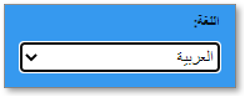
My Account users now have an option for Arabic in the Language menu. With this release, the interface can be viewed in Arabic with right-to-left display, but additional testing and updates are planned for upcoming releases.
For more information, see also the WorldCat Discovery release notes for Arabic user interface.
New navigation bar color - coming in late June
Updated June 7, 2021
You will soon be able to specify a navigation bar color to provide your library users with an enhanced user interface.
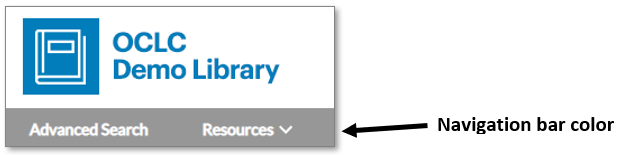
Currently, My Account utilizes two color selections from OCLC Service Configuration: Search and fulfillment buttons, Banner and footer color. With the June release, My Account will also utilize the Navigational bar color.
My Account colors are determined as follows:
| This Service Configuration setting... | Currently determines the color for... | In June, will determine the color for... |
| Colore dell'intestazione e del piè di pagina |
|
|
| Pulsanti di ricerca e di adempimento |
|
|
| Navigational bar color** - NEW WITH JUNE RELEASE | Non applicabile |
|
*List headers will have a white background and black text. Additional information will be included in the June release notes.
**If a Navigation bar color has not been previously set, the default color 545454 (dark gray) will be used. Depending on the color selection, the text on the navigation bar will be either white or black.
To adjust the color selections at any time, go to OCLC Service Configuration and select WorldCat Discovery and WorldCat Local > User Interface Options > Branding & Customization. You may wish to adjust the colors proactively prior to the release in late June.
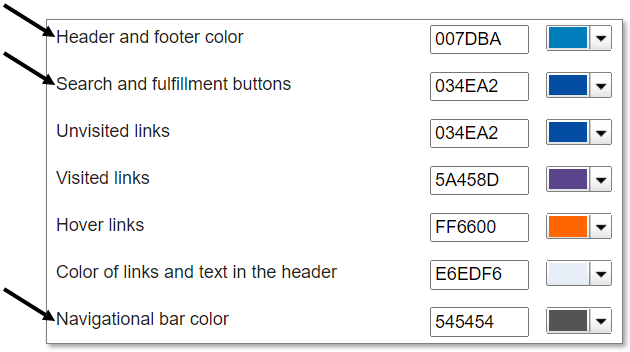
If your institution subscribes to WorldCat Discovery
The color selections described above also determine the Branding & Customization for the WorldCat Discovery interface. For additional details, please review the information for WorldCat Discovery Modernization.
If your institution DOES NOT subscribe to WorldCat Discovery
Your Navigation bar color will be pre-set to the Header and footer color darkened by 27%. If you wish to select a different color, you may do that in Service Configuration as described above.
For more information, see Branding & Customization.
Note: Color selections for Unvisited links and Visited links (shown in the screenshot above) will also be enabled for My Account. Additional information will be included in the June release notes.
New tab labels - coming in late June
With the June release, the Requested tab will be renamed Requests. This new label better reflects tasks that can be performed on this tab, for example, see existing requests, edit requests, and create new requests.
For libraries with WorldShare Circulation
With the June release, the Checked Out tab will be renamed Checkouts to align with the new Requests tab label.
Internet Explorer 11 support ends in August 2021
Please note that support for Internet Explorer 11 (IE 11) ends in August 2021. Some features in IE 11 will continue to work, but issues will not be fixed. Contact OCLC Support as soon as possible if this poses any concern for your institution.
Bug fixes and known issues
For a full list of current and recently fixed issues, see Known issues for My Account.
Important links
Post-release sessions
To help you become familiar with the new features, enhancements and improvements included in this release, update sessions scheduled. Please note the session time zones when registering. The sessions will be recorded and archived for future viewing on the OCLC Community Center. Please register, even if you are unable to attend, to receive a link to the recorded session.
-
- Product Insights: WorldCat Discovery
- Date: Thursday, May 26, 2021, 12:00 pm EST
- Register Now
- Circolazione WorldShare
- Product Insights: WorldShare Management Services
- Date: Tuesday, June 15, 2021, 1:00 pm EST
- Register Now
- Tipasa
- Product Insights: Resource Sharing
- Date: Tuesday, July 13, 2021, 2:00 pm EST
- Register Now
Support websites
Support information for this product and related products can be found at: