Prestito esterno al sistema
Borrowing libraries will typically only resort to off-system email lenders when they have exhausted their in-system lender strings and have still not filled the request, or because the nature of the material demands that they have to start the request off-system.
Create off-system borrowing requests
Create off-system requests by taking an existing new or exhausted ILL request and changing the fulfillment type to Off-System Request.

To change the fulfillment type of a request:
- Locate the request you want to change to an off-system request.
- In the request, click Change Fulfillment Type > Off-System Request.
- Completare i dettagli della richiesta esterna al sistema.
- Immettere le informazioni sul partner esterno al sistema nei campi Nome della biblioteca o Simbolo della biblioteca che effettua il prestito. L'elenco dei partner si aggiornerà durante la digitazione con le voci corrispondenti immesse nella Rubrica della configurazione del servizio OCLC.
- Una volta selezionato il prestatore dall'elenco dei partner, l'indirizzo e-mail e la data di richiesta verranno compilati automaticamente con le informazioni del record della Rubrica per l'istituto partner. Verrà compilato anche l'indirizzo da restituire a.
- Fare riferimento alla Rubrica per trovare informazioni sull'aggiunta all'Elenco partner.
- Immettere le informazioni sul partner esterno al sistema nei campi Nome della biblioteca o Simbolo della biblioteca che effettua il prestito. L'elenco dei partner si aggiornerà durante la digitazione con le voci corrispondenti immesse nella Rubrica della configurazione del servizio OCLC.
- The request moves to the Off-System Request > Borrowing queue.
Includere i partner esterni al sistema nelle sequenze delle biblioteche a cui far richiesta tramite l'automazione
I simboli OCLC per gli istituti partner esterni al sistema possono essere inclusi nelle sequenze delle biblioteche che effettuano il prestito create dall'automazione. Sebbene il partner esterno al sistema non possa in genere fornire articoli tramite la rete OCLC , questi possono comunque avere un simbolo OCLC . Per determinare se l'istituto ha già un simbolo OCLC, cercalo nel WorldCat Registry.
Nota: se l'istituto partner esterno al sistema non dispone di un simbolo OCLC, inviare una richiesta al supporto OCLC per la creazione di un simbolo e per la configurazione della richiedibilità tramite Z39.50.
Affinché i partner esterni al sistema possano essere inclusi nelle sequenze delle biblioteche a cui far richiesta, l'istituto partner deve disporre di un simbolo OCLC incluso nella Rubrica. Il simbolo OCLC deve:
- Possedere posseduti in WorldCat o l'automazione deve essere in grado di cercare i posseduti nel catalogo tramite Z39.50
- Essere incluso in un gruppo di posseduto personalizzato e percorso utilizzato dall'automazione
- Lo stato del fornitore OCLC è impostato su No, il che significa che è possibile richiedere solo via e-mail.
- Non essere un simbolo riservato come OFSYS o RAPID
- Non essere collegato a un altro partner nella tua rubrica.
Configurare l'istituto partner per l'uso in sequenze prestatori automatizzate
Una volta che conosci il simbolo OCLC per il tuo istituto partner:
- Aggiungere l'identificativo OCLC al record del partner nella Rubrica.
- Includere l'identificativo OCLC in un gruppo e in un percorso di posseduto personalizzati. Per ulteriori informazioni, fare riferimento a Gruppi di posseduto personalizzato e Percorsi di posseduto personalizzato.
- Includere il percorso dei posseduti personalizzato in un'automazione utilizzando il Gestione richieste automatizzata.
- Nelle impostazioni dei flussi di lavoro avanzati, abilitare l'uso di partner esterni al sistema nelle sequenze delle biblioteche a cui far richiesta.
Quando la richiesta viene inviata all'automazione, il sistema controlla i simboli posseduti inclusi nel percorso dei posseduti personalizzato e crea la stringa del prestatore applicando i criteri specificati per l'automazione.
Man mano che la richiesta si sposta nella sequenza delle biblioteche a cui far richiesta, il tipo di evasione cambia automaticamente tra richieste ILL e richieste esterne al sistema, a seconda che l'istituto sia un fornitore ILL o un partner esterno al sistema.
- Se lo stato del fornitore OCLC è impostato su Sì, la richiesta viene inviata alla biblioteca che effettua il prestito come richiesta ILL.
- Se lo stato del fornitore OCLC è No e il simbolo è stato configurato correttamente per la richiesta esterna al sistema, la richiesta viene inviata come richiesta esterna al sistema.
-
Se il prestatore è un partner esterno al sistema, il sistema invierà automaticamente l'e-mail CanYouSupply appropriata a quel partner. Per ulteriori informazioni, fare riferimento a Notifiche .
-
Per ulteriori informazioni sulle automazioni, fare riferimento a Gestione richieste automatizzate.
Update off-system request details
Off-system requests will need to be edited for two main reasons:
- È necessario elaborare e rispondere a un messaggio e-mail in arrivo dal partner esterno al sistema della richiesta.
- È necessario avviare la fase successiva della transazione ILL e inviare un'e-mail indicando la modifica al partner esterno al sistema della richiesta.
Tutti i campi nelle richieste esterne al sistema sono sempre modificabili. Alcuni campi sono considerati essenziali e il sistema avviserà l'utente se questi campi vengono rimossi per errore o non sono mai stati inseriti:
- Partner name
- Need-before date of the request
- Titolo dell'item richiesto
Process updates in an existing off-system request
Quando si ricevono aggiornamenti da un partner esterno al sistema per una richiesta esistente, utilizzare l'opzione Nota sulla richiesta e immettere eventuali aggiornamenti o informazioni importanti come Nota dello staff. Copia e incolla o inserisci manualmente le informazioni nella nota, inclusi e-mail, date, indirizzi e altre informazioni pertinenti.
The Staff Notes tab allows you to keep notes that are viewable and searchable only by your library staff and can be used as a repository for information about your off-system request. Staff Notes can be added to active and closed requests. The number on the tab indicates how many Staff Notes currently exist for a particular request. Refer to Staff Notes for additional information.
Edit and add Staff Notes
All staff users within an institution can add, edit and delete notes. Any staff member may edit any existing notes. The original author displays in the left column with the most recently-edited-by user name appearing just below the note.
Note: Only staff with the WorldShare ILL Admin role will be able to see the name of the author of the staff notes. Staff with the WorldShare ILL User role will see a date and time stamp for when the note was created/updated along with the name of the library.
The most recently added note will display at the top of the Staff Notes tab. Edited notes display based on the updated date and time.
Add a Staff Note
Note: There can be up to 500 notes per request.
- From the request, select Note from the Actions panel.
- Add the text of your note to the Add Staff Note text box.
- There is a 500-character limit for each note.
- Click Add.
- To remove any text added to the Add Staff Note box, click Cancel.
Edit a Staff Note
- From the request, click on the Staff Notes tab.
- Next to the desired Staff Note, click on the button.
- Select Edit.
- Make the desired edits in the text box.
- Click Update to save your changes.
A message appears confirming the note was successfully saved.
Change the status of an off-system request
When it is time to Cancel, Ship, Receive, Return, or check in an off-system request, it is recommended that staff make the necessary updates to the request details before changing the request status.
- Alle richieste di prestiti esterni al sistema con ritardo di 14 giorni verrà automaticamente applicato lo stato di scaduto e un'e-mail di prestito scaduto esterna al sistema verrà inviata automaticamente al destinatario del prestito esterno al sistema.
Use the Change Status dropdown to change the request status. Select the appropriate status after request details are updated.
Se è stata attivata l'integrazione della circolazione nella configurazione del servizio OCLC, queste impostazioni si estendono alle richieste esterne al sistema, consentendo l'aggiornamento di queste richieste anche all'interno del sistema di circolazione. Se abilitata, è possibile aggiornare la richiesta con un codice a barre temporaneo per comunicare con il sistema di circolazione locale.
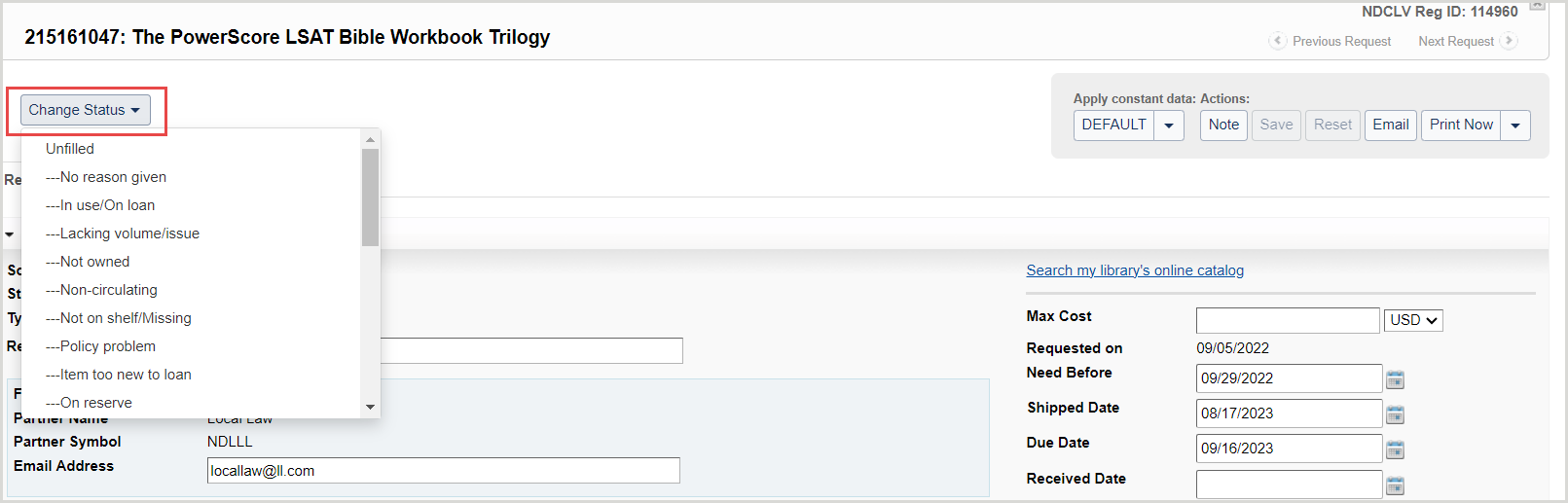
Note: Changing the status of a request automatically saves any changes that have been made.
Se la modifica di stato è importante per l'utente, utilizzare il pulsante E-mail per inviare un'e-mail con informazioni sullo stato della richiesta.
- Changing the status to Returned will cause the system to mark the request as Closed and populate the Return/Closed Date. You do not need to wait for the off-system partner to confirm via email that the item has been received.
Invia un'e-mail a un partner esterno al sistema
Use the Email button to send an appropriate email to the off-system partner. Emailing the off-system partner after updating the request details and status ensures that the email contains all the correct details.
A condizione che il modello di e-mail personalizzato abbia un tipo di destinatario appropriato di OFF_SYSTEM_REQUESTER o OFF_SYSTEM_SUPPLIER, il sistema prepopola l'indirizzo e-mail del destinatario con l'indirizzo e-mail del partner nella richiesta.
- To review emails sent regarding an off-system request, navigate to the Notifications section of the Request History accordion on the request.
- To review emails received regarding an off-system request, navigate to the Staff Notes tab to review the history of messages received and manually entered as a Note.
Si consiglia di utilizzare modelli separati per ciascuna delle principali modifiche di stato: Richiesta, Annulla, Spedito, Inevaso, Ricevuto, Restituito, ecc., poiché ciò li rende più facilmente identificabili nella cronologia delle notifiche. Per ulteriori informazioni, vedere Notifiche .
Nota: specifici modelli di notifica esterna al sistema sono disponibili per i messaggi Si può fornire, Annulla e Scaduto . Nella configurazione del servizio OCLC, fare clic sull'opzione del modello per abilitare questi modelli quando si inviano manualmente e-mail da richieste esterne al sistema.
Esempio di modello del prestatario da utilizzare per l'invio di e-mail a un prestatore esterno al sistema:
Close off-system requests
Se è stata configurata l'impostazione Giorni per rispondere per Copia o Prestiti tramite le informazioni sul partner nel modulo Rubrica all'interno di OCLC Service Configuration, il sistema utilizzerà tale lasso di tempo per la scadenza delle richieste di prestito esterne al sistema. Per ulteriori informazioni, fare riferimento alla Rubrica.
Se i Giorni per rispondere non sono stati configurati nella Rubrica, il sistema scadrà automaticamente le richieste di prestito esterne al sistema se la richiesta raggiunge:
- The Need Before date
- Request status becomes Closed (Expired)
- Reason for no is Aged to Expired
- The Days to Respond
- 8 days for copies and 16 days for loans
- Lo stato della richiesta diventa Chiusa (Non evasa) o passa alla biblioteca successiva nella sequenza delle biblioteche a cui far richiesta
- Reason for no is Aged to Unfilled
Se il sistema ha inviato la richiesta al partner corrente, il sistema invierà automaticamente il messaggio di annullamento esterno al sistema al partner che effettua il prestito corrente.
Once the request is Closed (Unfilled), you may add new lenders to the lender string and Resend the request. You may also use the Change Fulfillment Type button to change the type of request, or select Off-System Request and submit the request to a new off-system partner.
Statistics and Reporting for off-system requests
Review off-system requests using OCLC Usage Statistics to track your off-system requests along with all your other forms of ILL requests.
Off-system requests will appear in the Borrower/Lender Resource Sharing Stats Report in Usage Statistics. See WorldShare Interlibrary Loan reports for more information.
Note: All off-system requests displayed in statistics will show the off-system partner as having the OFSYS OCLC symbol.