Campi di richiesta di prestito
Select whether you are using the Legacy interface or the Modernized interface in Tipasa.
Per visualizzare i campi di richiesta di prestito, fare clic sull'ID richiesta di una richiesta di prestito esistente o creare una nuova richiesta utilizzando un modulo di lavoro vuoto. È anche possibile configurare i Dati costanti del destinatario del prestito e applicare queste informazioni a una nuova richiesta, modificando i campi secondo necessità.
i campi visibili cambiano a seconda dello stato e del tipo di richiesta di prestito.
Request
La scheda Richiesta offre informazioni specifiche sulla richiesta, opzioni di consegna e fatturazione, informazioni sull'utente e storico delle richieste.
Multiple Requests
L'opzione Richieste multiple consente all'istituzione di inviare più richieste per lo stesso elemento contemporaneamente a diverse sequenze delle biblioteche a cui far richiesta. Questa funzionalità è utile per le richieste del Club del libro in cui sono necessarie più copie di un singolo articolo. La Quantità di richieste consente 20 richieste diverse.

Dettagli richiesta
The Request Details accordion includes important bibliographic information about the request.
Nota: il formato di date e ore viene visualizzato nell'interfaccia in base alle informazioni sul proprio istituto contenute nel WorldCat Registry. Le date e gli orari verranno visualizzati nel fuso orario e nel formato preferito dell'istituzione.
Field descriptions:
| Campo | Descrizione |
|---|---|
| Patron Summary | Passare il mouse per visualizzare un breve riepilogo delle informazioni sul lettore che vengono visualizzate in fondo alla richiesta. |
| Fonte | Il sistema di origine da cui è stata generata la richiesta. |
| Status | Lo stato della richiesta. |
| ID locale | Any local identifier number (for example, a call number or barcode number). |
| Title/Journal | Title of the item [e.g., book or journal (if it is an article request)]. |
| Uniform Title | Preferred title. |
| Autore | Author of the item. |
|
Editore |
Publisher name, City of publication, and Publication date. |
| ISBN | International Standard Book Number (ten or thirteen-digit number). |
| ISSN | International Standard Serial Number (eight-digit number). |
| OCLC | OCLC Number, a unique identifier assigned to WorldCat Records. |
| DOI | Digital object identifier. |
| PMID |
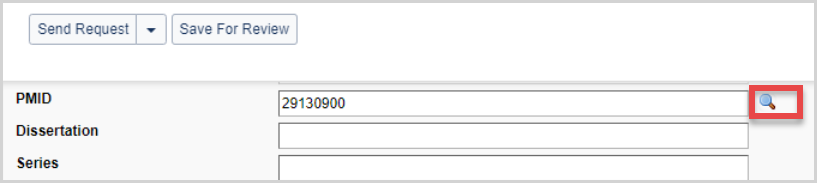
Identificatore PubMed. Immettere un PMID e utilizzare la lente d'ingrandimento per recuperare informazioni sulla citazione da PubMed. Se le informazioni della citazione sono corrette, selezionare Applica e salva per applicare le informazioni della citazione PubMed alla richiesta.
|
| Series | Title of Series. |
| Tag richiesta | Le etichette sono etichette personalizzate che possono essere applicate alle richieste attive. La biblioteca può utilizzare le etichette per raggruppare e tenere traccia delle richieste. Le etichette sono visibili solo alla tua biblioteca. Per ulteriori informazioni, vedere Etichette. |
| Tipo |
Indicates the type of request (Copy or Loan). |
| Formato | Format of the item. |
| Lingua | Language of the item. |
| Edizione | Edition of the item. |
| Preferred edition | Edizione preferita dell'item. |
| Formato di consegna preferito |
Preferenza dell'utente per materiali elettronici o cartacei. I valori includono:
Se il formato di consegna preferito non è incluso nel modulo di richiesta, il valore predefinito è Nessuna preferenza. |
| Titolo dell'articolo | Title of the requested article. |
| Article Author | Author of the article. |
| Volume | Volume of the item. |
| Issue/No | Issue of the article. |
| Issue Date | Date of the issue. |
| Pages | Page numbers of the article or chapter. |
| Requested On/Received Date | The date the request was placed and the date the requested item was received. |
| Renewal Requested | Viene visualizzato per le richieste nella coda Rinnovi richiesti. La data di rinnovo richiesta viene visualizzata quando specificata. |
| Renewal GRANTED/DENIED | Indicates if a renewal request was granted or denied. |
| Rinnovi | The number of renewal requests. |
| Need Before |
Date by which you want to receive the item.
|
| Return Date | Data di restituzione dell'articolo. |
| Due Date | Due date of the request. |
| New Due Date | The new due date after a renewal request is approved. |
| Verification | Source of bibliographic information. |
Copyright Clearance
Libraries in the Australia, New Zealand, Spain, and the United Kingdom can track patron acceptance of local copyright terms. To add copyright compliance and acceptance information to your request form, please see Add copyright compliance and acceptance for non-US Libraries.
Copyright Signature indicates whether or not the patron has acknowledged the copyright terms. Options include:
- Not applicable
- Signature Required
- Firma ottenuta
Indicate your compliance for copy requests by selecting one of your country's valid codes.
| Regione | Conformità al diritto d'autore |
|---|---|
| Stati Uniti |
|
| Australia |
|
| Canada |
|
| Nuova Zelanda |
|
| Spagna |
|
| Regno Unito |
|
Lending Information
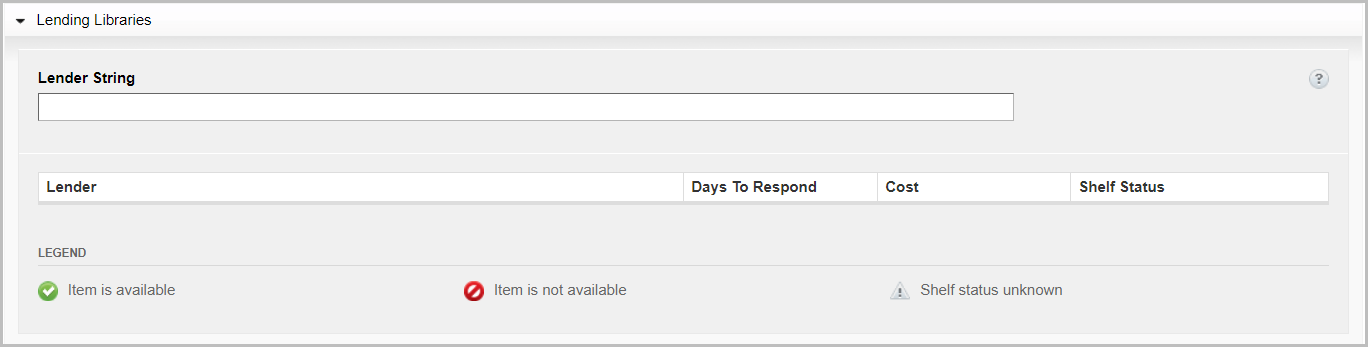
Under the Lending Libraries accordion, you can enter your preferred lending institutions. Up to 15 institution symbols(s) can be entered into the Lender String field.

| Campo | Descrizione |
|---|---|
| Lender | The lender's institution symbol, institution name, and location. |
| Giorni per rispondere | The lender's Days to Respond setting as configured in the lender's Policies Directory. Please see Days to Respond for more information. |
| Cost | The lending institution's fees for Copies or Loans as configured in the Policies Directory. |
Quando il prestatore ha risposto Sì alla richiesta, le informazioni fornite dal prestatore verranno visualizzate nell'elenco a discesa Informazioni sul prestito.
| Campo | Descrizione |
|---|---|
| Use ILL Fee Management (IFM) | L'uso da parte della bibliotecaria di ILL Fee Management (IFM) è indicato qui. |
| Lending Notes | Notes from the lending library regarding the terms of the loan. |
| Restituire via | The lending library's preferred method for returning loaned materials. |
| Return To and address fields | The return mailing information for the lending library. |
Borrowing Library
The borrowing library information is where the borrowing library enters their information regarding the Electronic Delivery setting, Shipping information, and Billing Information.

Electronic Delivery
Scegliere il metodo di consegna elettronica. È possibile impostare un metodo di consegna preferito e un metodo alternativo. Queste informazioni sono configurabili anche come dati costanti.
| Campo | Definizione |
|---|---|
| Article Exchange | Consegna tramite OCLC Article Exchange. |
| Risorsa elettronica | Delivery via email |
| ILLiad Odyssey | Delivery via ILLiad Odyssey software. |
la consegna elettronica è definita nella scheda Contatti di OCLC Policies Directory. Accedere alla directory dei criteri per apportare modifiche.
Spedizione
Borrowing libraries can set the preferred shipping information. This information is configurable as constant data as well.
| Campo | Descrizione | Configurable as Constant Data? |
|---|---|---|
| Shipping Information | Complete mailing address and contact information: | Sì |
| Spedire tramite | Metodo di spedizione preferito. | Sì |
|
Group Affiliations
|
Enter the symbols, names, or acronyms of your reciprocal, local, or OCLC's Profiled Groups to display to lenders. Esempio:
|
Sì |
| Note prestito | Additional information needed to clarify the request. | Sì |
Billing
Borrowing libraries can set the preferred billing information. This information is configurable as constant data as well.
| Campo | Descrizione | Configurable as Constant Data? |
|---|---|---|
| Bill Information | Complete the billing address and contact fields. Click Copy From Shipping Info to use the same information from the Shipping and Contact Info fields. Otherwise, provide new information. | Sì |
| Note di fatturazione | Informazioni di fatturazione aggiuntive, se necessarie. | Sì |
| Use ILL Fee Management (IFM) for payment | Select the ILL Fee Management (IFM) check box to enable IFM. For more information on IFM, see Interlibrary Loan Fee Management (IFM). | Sì |
|
Importo massimo (in dollari USA) che puoi pagare per l'elemento. Digitare l'importo che si vuole pagare e selezionare la casella di controllo IFM per applicare IFM. riflette il costo totale, non il costo per pagina Se non si desidera pagare, lasciare la casella di controllo vuota e digitare 0.00 nella casella. se non si fornisce un valore, l'utente è responsabile di tutti i costi addebitati dal prestatore. Se entrambe le caselle IFM e Costo massimo sono vuote, il prestatore è in grado di specificare un importo di Costo massimo quando la richiesta viene restituita. L'utente accetta automaticamente di pagare l'importo specificato quando si aggiorna la richiesta. |
Sì |
Patron
Aggiungere l'utente appropriato e collegarlo al suo account Tipasa per consentire all'utente di ricevere notifiche e-mail e tenere traccia della richiesta in Il mio account. Per ulteriori informazioni, vedere Collegare un utente alla richiesta.
| Campo | Descrizione |
|---|---|
| Nome |
Nome dell'utente.
Examples:
|
| ID | A number used for patron identification |
| Status | Stato dell'utente (all'interno della biblioteca, azienda, scuola, ecc.), selezionato da un elenco di stati personalizzati. Per informazioni su come personalizzare l'elenco, vedere 11. Valori dei campi. |
| Dipartimento | The Department associated with the patron. For more information on adding Department, see 11. Field Values. Be consistent in the use of department names. |
| Patron Contact information | Enter the patron's address, phone number, or fax number. |
| Patron's Email address. | |
| Nome posizione di ritiro | Nome della sede di ritiro preferita dell'utente come definito nelle impostazioni delle sedi ILS nel modulo CIrulation Integration di OCLC Service Configuration. Per ulteriori informazioni, vedere Posizioni ILS. |
| Pickup Location Code | Il codice della posizione di ritiro preferita dell'utente come definito nell'impostazione posizioni ILS all'interno del modulo Integrazione circolazione della configurazione del servizio OCLC. Per ulteriori informazioni, vedere Posizioni ILS. |
| Nota |
Qualsiasi informazione pertinente sulla richiesta o sull'utente. Questo campo non può essere riutilizzato. |
Le informazioni sull'utente possono anche essere aggiunte come dati costanti o modificate direttamente nel modulo di lavoro.
Request History
La scheda Cronologia richieste fornisce dettagli sulla cronologia della richiesta di prestito.
Nota: il formato di date e ore viene visualizzato nell'interfaccia in base alle informazioni sul proprio istituto contenute nel WorldCat Registry. Le date e gli orari verranno visualizzati nel fuso orario e nel formato preferito dell'istituzione.
| Campo | Descrizione |
|---|---|
| Copied From | If the current request was created from an existing request, a link to the original request ID appears. |
| Automation History | Elenca lo stato risultante dall'attività del Gestore richieste automatizzato, dalla convalida dell'utente e dalla gestione del copyright. |
| Supplier History | Lists the OCLC symbol of each lending library who engaged with the request, including their response and the date of the response. |
| ILL Fee Management (IFM) History | Log of all Interlibrary Loan Fee Management related history, if IFM has been used for the request. |
| Notification Log | Log of all email and SMS notifications sent related to the request. |
| Circulation History |
Per le biblioteche WorldShare Management System con l'integrazione della circolazione abilitata. Questa sezione conferma la creazione di un elemento temporaneo, fornisce informazioni sul codice a barre e traccia la cronologia della richiesta. Please see WorldShare Circulation Integration for more information about enabling this functionality. |
| Log ISO |
Contiene informazioni sulle transazioni ISO con sistemi ILL esterni che utilizzano il protocollo ISO 18626. Il protocollo ISO 18626 consente alle biblioteche non OCLC di richiedere dalle biblioteche WS-ILL e viceversa. Il log ISO fornisce dettagli sulle transazioni ISO , tra cui la data e l'ora della transazione, lo stato, l'identificativo OCLC della biblioteca esterna e l'ID richiesta nel sistema non OCLC . Il registro include anche la causa di eventuali errori che potrebbero essersi verificati. |
Automation History messages
Purchase
Use the purchase tab to review item prices and see links to vendor sites.
Staff Notes
The Staff Notes tab allows you to keep notes that are viewable and searchable only by your library staff. Staff Notes can be added to active and closed requests. The number on the tab indicates how many Staff Notes currently exist for a particular request.
Edit and add Staff Notes
All staff users within an institution can add, edit and delete notes. Any staff member may edit any existing notes. The original author displays in the left column with the most recently-edited-by user name appearing just below the note.
Note: Only staff with the WorldShare ILL Admin role will be able to see the name of the author of the staff notes. Staff with the WorldShare ILL User role will see a date and time stamp for when the note was created/updated along with the name of the library.
The most recently added note will display at the top of the Staff Notes tab. Edited notes display based on the updated date and time.
Aggiungi una nota
Note: There can be up to 500 notes per request.
- From the request, select Note from the Actions panel.
- Add the text of your note to the Add Staff Note text box.
- There is a 500 character limit for each note.
- Click Add.
- To remove any text added to the Add Staff Note box, click Cancel.
Edit a Staff Note
- From the request, click on the Staff Notes tab.
- Next to the desired Staff Note, click on the button.
- Select Edit.
- Make the desired edits in the text box.
- Click Update to save your changes.
A message appears confirming the note successfully saved.
Delete a Staff Note
Caution: Deleted notes are not retrievable.
- From the request, click on the Staff Notes tab.
- Next to the desired Staff Note, click on the drop-down.
- Select Delete.
- A message appears asking you to confirm deletion of the Staff Note.
- Fare clic su Elimina.
A message appears confirming the Staff Note has been deleted.


