
Menu contestuale
Overview
Ogni volta che si fa clic su un campo variabile all'interno del record MARC 21, è possibile visualizzare il menu contestuale fluttuante per visualizzare le informazioni sul campo o per inserire sottocampi.
Per aprire la finestra di aiuto contestuale, premere Maiusc e fare clic su un campo per il quale si desidera visualizzare le informazioni.
Nota: le informazioni contenute nella casella del menu contestuale cambiano in base al campo in cui si trova il cursore.
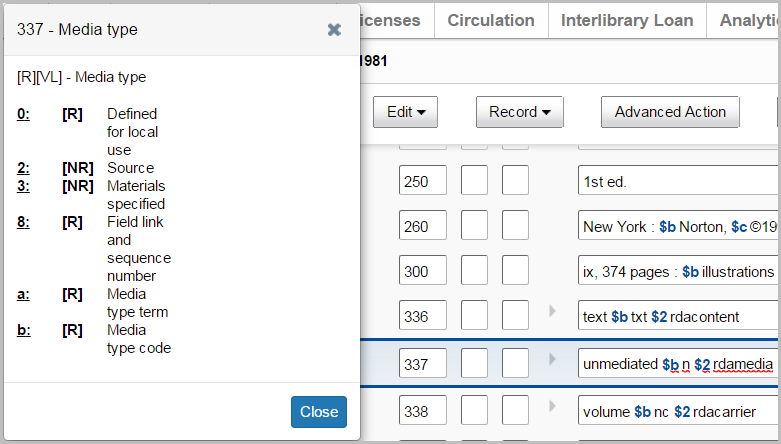
Inserire un sottocampo con la casella del menu contestuale
- Dall'editor MARC 21, fare clic su un campo.
- Premere Maiusc e fare clic sul pulsante del mouse o del touchpad per aprire il menu contestuale.
- Fare clic sul nome di un sottocampo (ad esempio, 0, a, ecc.) per aggiungerlo al campo.
- (Facoltativo) Fare clic su un altro campo e ripetere i passaggi 2 e 3.
- Fare clic su Chiudi.
Spostare e ridimensionare la casella del menu contestuale
Il riquadro del menu contestuale può essere spostato all'interno della finestra del browser in modo da poterlo posizionare nella posizione preferita.
Per ridimensionare la casella del menu contestuale, trascinare l'angolo destro e aumentare l'altezza e la larghezza della casella.
Una volta spostata e ridimensionata, la casella del menu contestuale rimane in quella posizione finché non si esce dall'applicazione WorldShare. La casella del menu contestuale rimane in questa posizione anche se viene chiusa e riaperta in un secondo momento. Rimane in posizione anche quando si scorre il record nel browser.