
WorldShare Acquisitions Release Notes, December 2023
Release Date: December 12, 2023
Introduction
This release of WorldShare Acquisitions provides three new features and enhancements. These features will help you manage more complex workflows, including:
- Enabling future budgets for use
- New "Will Not Receive" receipt status
- Restrict automated retrieval of files by file prefix
Many of these enhancements are the direct result of your feedback.
Recommended actions
For this release, we recommend that you review the following checklists and complete the relevant tasks so that you can adjust your policies and workflows and train your staff. These checklists identify updates that we have determined as significant for most institutions. We encourage you to review all of the items in the release notes to determine whether there are other items that might require additional action or follow-up by your institution.
Administrative actions
These items require immediate action or decisions.
| Azione |
|---|
|
None at this time. |
Follow-up actions
In an effort to keep your staff informed of new features and changes, you may also want to consider these items.
| Azione |
|---|
|
Consider enabling future budgets for use if planning on splitting items over multiple future budget periods. |
New features and enhancements
Enable future budgets for use
You can now enable future budgets - even beyond the budget immediately after the current budget - for use when ordering and invoicing. This allows the library to split items over far future budgets when the accrual mode functionality does not meet the need for how they want to split money across future budget periods. For example, the current accrual functionality splits subscriptions across future budget periods based on the number of days that fall within the budget period. If you want to split the money based on different criteria, you may want to simply assign the future budget period to the item at the time of ordering or paying. This can be done now for the budget period immediately after the current budget but not for budgets farther in the future, prohibiting tracking of items paid from budgets farther in the future (e.g. three year subscriptions).
To enable a future budget for use:
- Go to the budget you wish to enable.
- At the top of the page, select "Enable for use".
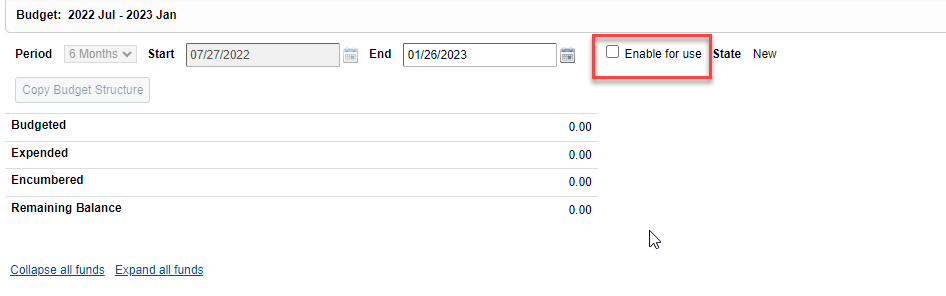
- In the resulting confirmation dialog, confirm that you want to enable for use.
- Now, the budget period should be available for selection on the order item and invoice item. However, the default budget period will still be the current budget. (In the future, we plan to add a way to set future budgets as the default budget.)
Will not receive receipt status for cancelled copies
You can now cancel copies, and the receipt status of the copies will be set to "Will not receive (cancelled)". This will help libraries that are claiming items with a quantity greater than one where only some of the copies are cancelled. Previously, if you cancelled some copies of an item with multiple copies, the cancelled copies would still have a receipt status of "Not Received." This resulted in the partially cancelled items continuing to appear on "missing items" list for claiming. Now, when you cancel copies, the receipt status is set to "Will not receive (cancelled)" resulting in these items not being shown on missing items pages. If you "unreceive" a copy that was both previously received and cancelled (an unusual combination), the copy will be set to the "Will not receive (cancelled)" receipt status rather than "Not received."
Restrict automated retrieval of files by file prefix
You can now set up an automated job to only retrieve files from an FTP server with a specific file prefix. This allows libraries to set up multiple automated jobs to retrieve files from the same folder on the same FTP server. If a vendor or service provider provides files for multiple vendors or for multiple operations (e.g., order import and invoice import) in the same FTP folder, you can now have multiple jobs retrieve these different files from the same folder as long as the files have different file prefixes. This allows the library to set up automated jobs for more vendors and service providers with different FTP folder configurations.
To restrict automated retrieval of files by file prefix:
- Open an automated job.
- In the File Type section, select "Files with matching." Then enter the file prefix you want to use in the File Prefix box.
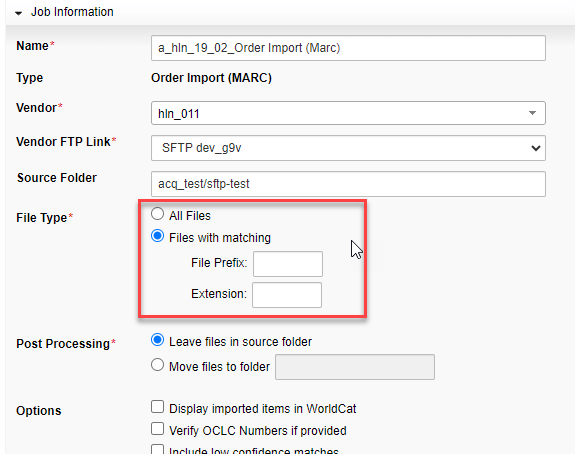
- Save the job.
- When the job is run, it will only retrieve files with that file prefix in the name of the file.
Important links
Support website(s)
Support information for this product and related products can be found at: