
WorldShare Acquisitions Release Notes, April 6, 2023
Release Date: April 6, 2023
Introduction
This release of WorldShare Acquisitions provides one new feature and one bug fix. This will help you manage more complex workflows, including:
- Filtering funds by fund status
Many of these enhancements are the direct result of your feedback.
Recommended actions
For this release, we recommend that you review the following checklists and complete the relevant tasks so that you can adjust your policies and workflows and train your staff. These checklists identify updates that we have determined as significant for most institutions. We encourage you to review all of the items in the release notes to determine whether there are other items that might require additional action or follow-up by your institution.
Administrative actions
These items require immediate action or decisions.
| Azione |
|---|
|
None at this time. |
Follow-up actions
In an effort to keep your staff informed of new features and changes, you may also want to consider these items.
| Azione |
|---|
|
None at this time. |
New features and enhancements
Filtra per Status del fondo
You can now filter funds on the budget page by their Fund Status. This saves you the time and effort of locating all the funds that have the same status. Previously, you could view the Fund Status of a fund on the budget page but not filter funds to only those with a specific status. Now, you can filter funds to one or more statuses on the budget page.
To filter funds by Fund Status:
- Open a budget by selecting a budget from the dropdown under the Budgets section in the left-hand panel and clicking Edit.
- At the top of the Budget page (above the Funds table) is a Fund Status filter. (It defaults to all statuses.)
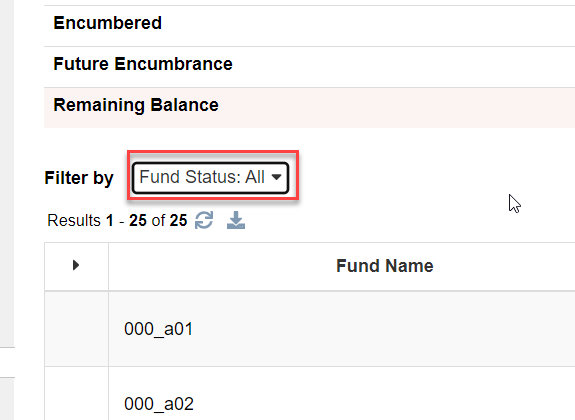
- Click on it and select the status or statuses you wish to filter by and click Apply.
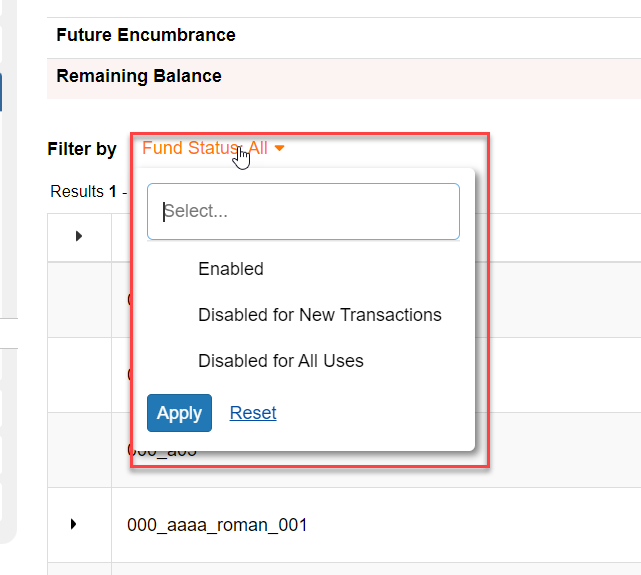
- The screen will only display those funds with that status. Note, however, that if a child fund is supposed to be displayed but it has a status that the parent fund does not have, the parent fund for the child fund will still display but will display in grey text to indicate that it has a Fund Status different from what was selected in the filter.
Bug fixes
Receiving via SIP2 now working properly
You can now receive shelf-ready materials in Acquisitions using your SIP2 book sorter. This functionality was not working previously due to a problem with the Acquisitions API being used by the SIP2 API. This problem has now been fixed, and you can receive imported shelf-ready materials using the SIP2 API now.
Important links
Support website(s)
Support information for this product and related products can be found at: