
WorldShare Interlibrary Loan release notes, September 2026
Release Date: 13 September 2026
Introduzione
This release completes staff interface modernization for WorldShare ILL, Tipasa, and Resource Sharing for Groups. Features marked (Tipasa and Resource Sharing for Groups only) do not apply to WorldShare ILL. Every supported workflow now runs in the modernized, accessible staff interface. Most changes are visual and navigational; queue names, workflows, and actions are unchanged. The exception is accessibility fields on bibliographic records (see below).
The updated pages meet Web Content Accessibility Guidelines (WCAG) AA standards, with higher contrast, improved font sizing, clearer buttons and navigation, and keyboard-navigable components throughout.
Accessibility information from bibliographic records (MARC fields 341 and 532) is now shown in Discover Items, so you can see whether an item meets a patron's accessibility needs before submitting an ILL request.
Each staff member's session now runs entirely in the modernized interface or entirely in the legacy interface — no more mixing the two on the same session. A New UI toggle in the WorldShare banner lets individual users switch between interfaces; your institution's setting in Service Configuration controls the default. See the checklists below and the Switch between the modernized and legacy staff interface section for details.
Azioni consigliate
For this release, we recommend that you review the following checklists and complete the relevant tasks and adjust your policies and workflows and train staff. These checklists identify updates that we have determined as significant for most institutions. We encourage you to review all of the items in the release notes to determine whether there are other items that might require additional action or follow-up.
Azioni amministrative
Questi item richiedono un'azione o una decisione immediata.
| Azione |
|---|
| For best performance, clear your browser’s cache before starting to work with WorldShare Interlibrary Loan, Tipasa or Resource Sharing for Groups. |
| Review your institution’s modernized interface setting in Service Configuration. It takes precedence over each staff member’s New UI toggle, and the two are reconciled when a staff member logs in. If an administrator turns off the modernized default in Service Configuration, staff will see the legacy interface at their next login, even if their toggle was on. |
Azioni successive
In an effort to keep your staff informed of new features and changes, please consider these items.
| Azione |
|---|
| Share these release notes with colleagues. Visit the OCLC Community Center to connect with OCLC and other community members. |
| Brief staff that their session now runs entirely in the modernized interface or entirely in the legacy interface, and show them the New UI toggle at the top right of the banner. |
| Let staff know their toggle choice is remembered in that browser when they log out and log back in, and reverts to the institution's default interface if their browser cookies are cleared or they use a private browsing window. |
| Let staff know to save work before switching between legacy and modernized interfaces using the toggle. The toggle reloads the page immediately. |
| Note that the Preview features section is being removed from Service Configuration. Pages are no longer released to a preview group ahead of general availability. |
Nuove funzionalità e miglioramenti
User interface changes
The following pages were added or updated in this release.
Trova elementi
- Search and search results
- Detailed bib record
- Holdings page
Richieste di acquisto
- Pagina Risultati coda
- Review for Purchase Sub-Queue Results page
- On Order Sub-Queue Results page
- Delivered Sub-Queue Results page
- Received? Sub-Queue Results page
- Not Reviewed Request View page
- On Order Request View page
- Received? Request View page
- Closed (Cancelled) Request View page
- Closed (Supplied) Request View page
Other pages
- Request History tab
- Find/Edit Patrons (Tipasa and Resource Sharing for Groups only)
- Lending Priorities (Tipasa and Resource Sharing for Groups only)
Redesigned side menu
The side menu now matches the look and feel of the modernized pages, with improved contrast and spacing for easier navigation between request queues. Previously, the side menu kept its legacy design on every page.
Menu items vary by product. Lending Priorities appears for Tipasa and Resource Sharing for Groups only.
Before and after September release
| Legacy side menu | Modernized side menu |
 |
 |
Modernized item discovery and holdings
You can now search WorldCat, view bibliographic details and view holdings using the modernized, accessible interface. Previously, these pages retained the legacy design even as surrounding pages were modernized, creating an inconsistent experience.
Before September release
Advanced search in the legacy interface at the top of the screen.

After September release
Advanced search in the modernized interface as a pop-up.

Before September release
Search results in the legacy interface.

After September release
Search results in the modernized interface.

Detailed bibliographic record, accessibility content
The detailed bibliographic record view now highlights accessibility information, including MARC fields 341 and 532:
- MARC 341 (Accessibility Content) — Lists accessibility features such as audio descriptions, closed captions, or readable transcripts.
- MARC 532 (Accessibility Note) — Free-text note describing how easy the item is to use for people with disabilities, including any limitations or special requirements.
When a record contains these fields, they appear on the bib record as Accessibility Content and Accessibility Note.
Before September release
A detailed bibliographic record in the legacy interface. The Accessibility Content and Accessibility Note fields are not displayed.

After September release
The same bibliographic record in the modernized interface. Accessibility Content (MARC field 341) and Accessibility Note (MARC field 532) are outlined in red.

The Holdings page is also now modernized and accessible.
Before September release
The Holdings page in the legacy interface, showing State Holdings for the record.

After September release
The same holdings page in the modernized interface, showing State holdings for the record.

Richieste di acquisto
You can now manage purchase requests in the same modern interface already used for borrowing and lending requests. Previously, Purchasing Requests was the last staff workflow entirely on the older interface.
This release updates the following purchasing views:
- The Queue Results and Sub-Queue Results pages for the Review for Purchase, On Order, Delivered, and Received? statuses
- The Request View pages for Not Reviewed, On Order, Received?, Closed (Cancelled), and Closed (Supplied) requests
Before September release
The Purchasing Requests queue results page in the legacy interface.

After September release
The same queue results page in the modernized interface, now consistent with the Borrowing and Lending request queues.

Before September release
The detail view of an individual purchase request in the legacy interface.

After September release
The detail view of an individual purchase request is now in the modernized interface.

Additional modernized purchasing views
Purchase request sub-queues
All of the subqueue pages have been modernized.

Review for Purchase Sub-Queue
The Review for Purchase sub-queue results page in the modernized interface.

On Order Sub-Queue
The On Order sub-queue results page in the modernized interface.

Delivered Sub-Queue Results
The Delivered sub-queue results page in the modernized interface.

Received? Sub-Queue Results
The Received? sub-queue results page in the modernized interface.

All detailed views of Purchase requests modernized
A Review for Purchase purchase request in the modernized interface.

On Order Request View
An On Order purchase request in the modernized Request View.

Received? Request View
A Received? purchase request in the modernized Request View.

Closed (Cancelled) Request View
After September release
A Closed (Cancelled) purchase request in the modernized Request View.

Closed (Supplied) Request View
After September release
A Closed (Supplied) purchase request in the modernized Request View.

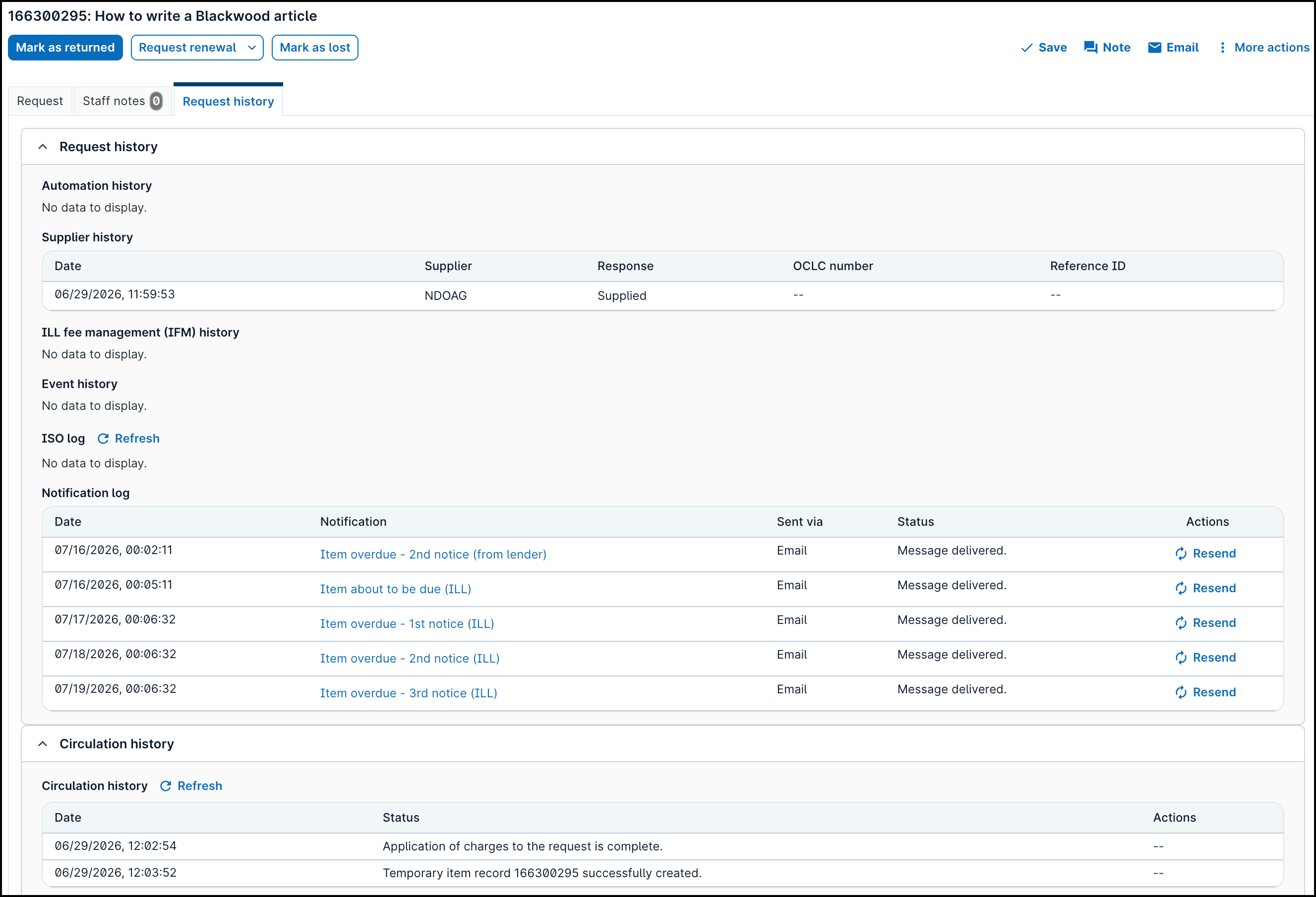
Request History tab
You can now view a request's full history in the same modern interface as the rest of the request pages. Previously, the Request History tab remained in the legacy design after the request details had been modernized.
Before September release
The Request History tab in the legacy interface.

After September release
The Request History tab now displays in the modernized interface.
Patron search, view, and edit (Tipasa and Resource Sharing for Groups only)
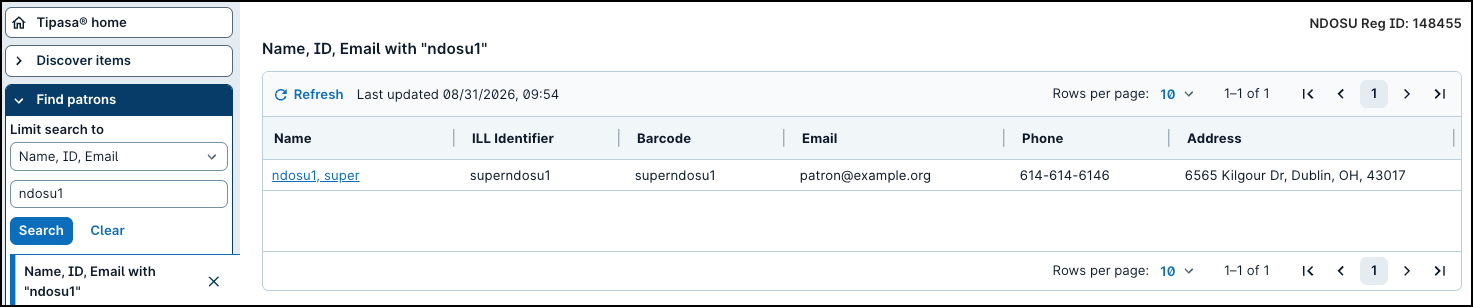
You can now find and view patron records in the same modern, accessible interface as the rest of the staff interface.
Before September release
Patron search results in the legacy interface.

After September release
Patron search results now display in the modernized, accessible interface.
Before September release
Viewing the patron record in the legacy interface.

After September release
The patron record now displays in the modernized interface.

Before September release
Editing the patron record in the legacy interface.

After September release
Editing the patron record in the modernized interface.

Lending Priorities (Tipasa and Resource Sharing for Groups only)
Lending Priorities is now consistent with the rest of the modernized lending screens. Batch-action queues and sub-queues now use the same modernized staff interface as other lending workflows. Queue names, actions, and batch behavior are unchanged.

Switch between the modernized and legacy staff interface, page by page
With this release the staff interface is fully modernized. A staff session for WorldShare ILL now runs entirely in the modernized interface or entirely in the legacy interface, rather than a mix of modernized and legacy components. Two settings determine if individual users are using the modernized or legacy interface:
- The library's default setting in Service Configuration and
- The new, individual, session-based toggle in the banner at the top of the screen.
The modernized interface setting — per institution
An institution’s setting in Service Configuration controls the default for a library, and it takes precedence over the new personal toggle described below.
The institution-level setting is found in the User Interface Settings tab of Service Configuration. This toggle sets the default for an entire institution: modernized or legacy interface. A change to the institution setting takes effect upon reloading the browser window or at next login after the change is made.

The New UI toggle — per staff member
You can now switch between the modernized and legacy staff user interface using a single toggle on each page (for example: Purchasing requests, Patron search, etc.). so you can move to the new design at your own pace. Previously, you could not choose between the two experiences on a page-by-page basis.
The new setting, the New UI toggle, sits at the top right of the WorldShare banner, next to Language, Help and your account name drop-downs. It appears on every page of the ILL staff user interface, so you can switch at any point in your workflow. Turning it on loads the modernized interface; turning it off returns you to the legacy interface.
The page reloads immediately after you make the switch. We recommend that you save your work and navigate to the ILL Homepage before making the change. If you do not navigate to the home page, your page may not fully reload and you will see a blank screen with the Interlibrary Loan tab at top of the screen. If this happens, click on the Interlibrary Loan tab and your ILL homepage will load.

Your choice is stored in your browser and is remembered, based on a cookie setting. When you log out and log back in, the service returns to the institution's default only if browser cookies are cleared or expire, or if the staff interface was opened in a private browsing window.
Because the setting is per staff member and per browser, two people at the same library can work in different interfaces at the same time, and your choice does not follow you to another browser or device.
The institution setting and the individual setting are reconciled when a staff member logs in.
If you turn off the modernized user interface, you will be asked to share your reason for returning to the legacy interface. Please provide your feedback as user responses help OCLC make improvements to the screens and workflows.

No action required
The NewUI toggle appears automatically in the staff user interface. No configuration is needed.
Preview features
The Preview features section is being removed from Service Configuration. Pages are no longer released to a preview group ahead of general availability, so this section no longer applies — a library uses either the modernized interface or the legacy interface.
Problemi noti
See the Known Issues page.
Collegamenti importanti
Siti web di supporto
Le informazioni di supporto per questo prodotto e i prodotti correlati sono disponibili all'indirizzo: