
My Account release notes, August 2026
Release Date: 18 August 2026
Applies to: Tipasa and Resource Sharing for Groups libraries with Patron Management and My Account
Introduzione
Patrons who are blocked from placing new interlibrary loan requests now see that status earlier and more clearly in My Account. Instead of reaching a request form — especially from WorldCat Discovery OpenURL (or other OpenURL) — and learning only when they try to submit that a request that it cannot go through; blocked patrons are notified when they sign in and cannot open request creation forms or buttons.
This release applies to Tipasa and Resource Sharing for Groups libraries whose patrons use My Account. It is especially relevant if your library blocks certain patrons for ILL while those patrons still use My Account for other functions — for example, libraries using WorldShare Management Services that block patrons for ILL but keep them active for local circulation.
Staff workflows for blocking patrons are unchanged. You continue to mark patrons as blocked for ILL in the Staff Interface or through patron load. If a blocked patron somehow still tries to submit a request, the system still rejects it - just as before.
Azioni consigliate
Per questa versione, si consiglia di rivedere i seguenti elenchi di controllo e completare le attività pertinenti in modo da poter modificare i criteri e i flussi di lavoro e formare il proprio personale. Questi elenchi di controllo identificano gli aggiornamenti che abbiamo determinato come significativi per la maggior parte degli istituti. Ti invitiamo a rivedere tutti i documenti nelle note sulla versione per determinare se vi sono altri articoli che potrebbero richiedere un'azione aggiuntiva o un follow-up da parte del tuo istituto.
Azioni amministrative
Questi item richiedono un'azione o una decisione immediata.
| Azione |
|---|
| For best performance, clear your browser's cache before starting to work with Tipasa or Resource Sharing for Groups. |
| Confirm that patrons who should not place new ILL requests are correctly marked Blocked for ILL in the Staff Interface or through your patron load (if you perform them) by setting illApprovalStatus to Blocked. |
Azioni successive
Al fine di mantenere il personale informato sulle nuove funzionalità e modifiche, è possibile prendere in considerazione anche questi elementi.
| Azione |
|---|
| Share these release notes with your colleagues. Visit the OCLC Community Center to connect with OCLC and other community members. |
| Brief staff who support My Account or ILL patrons — especially public services and circulation — on the new patron-facing behavior so they can answer questions consistently. |
| If patrons contact your library after seeing the blocked message, direct them to the appropriate local policy or office (for example, fines, alumni eligibility, or patron type restrictions). The system message instructs patrons to contact the library; your staff can provide local context. |
Nuove funzionalità e miglioramenti
Improved My Account experience for patrons blocked from ILL
What's new
When a patron is blocked for ILL, My Account now communicates that status prominently at the start of the patron session and prevents access to new request creation paths.
Notifica
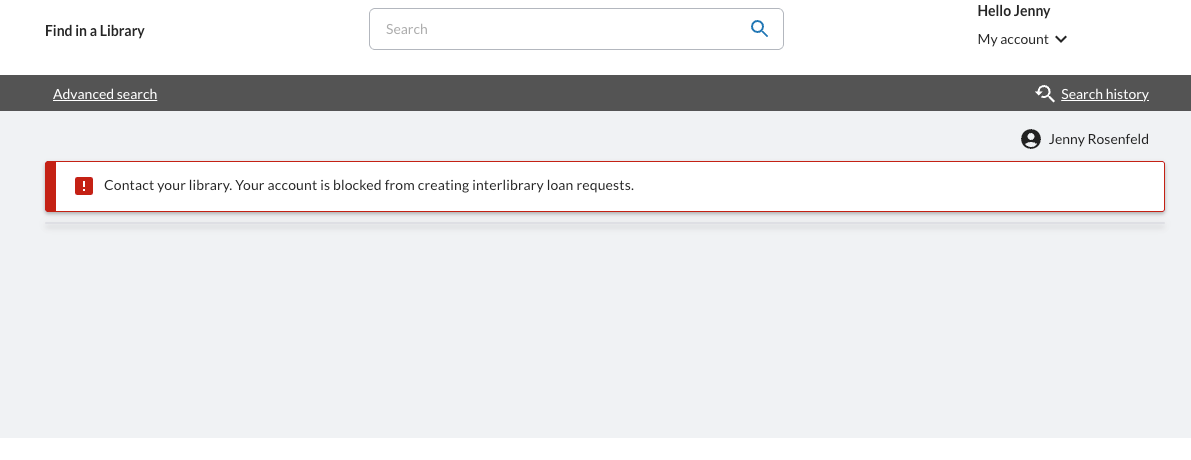
- A persistent error-level message appears at the top of all My Account pages when the patron is blocked for ILL:
- Contact your library. Your account is blocked from creating interlibrary loan requests.
- The message cannot be dismissed and remains visible throughout the patron's session.
- If the patron is blocked for both ILL and WMS circulation, or has a WMS circulation suspension in addition to an ILL block, a combined message displays the applicable restrictions (including a formatted suspension end date when applicable).
Request creation
- Create New Request buttons and other request-creation controls are hidden on the Requests tab for blocked users.
- Patrons cannot open ILL request forms, including:
- Blank request forms from Create New Request
- OpenURL request forms from Discovery or other external sources
- Request again button from the patron's list of requests
- If a blocked patron attempts to navigate directly to a request form URL, access is prevented and the restriction message is shown.
What patrons can still do
- Log in to My Account
- View existing interlibrary loan request history on the Requests tab
- Retrieve previously delivered content where still permitted (for example, Article Exchange links, knowledge base links, or open access links)
- Use other My Account functions not restricted by a separate WMS circulation block (for example, checkouts and holds, when the patron is not blocked for WMS circulation)
- Renew existing ILL loans in My Account when your library has Allow patrons to renew ILL requests online enabled in Patron Settings (Service Configuration → WorldShare Interlibrary Loan → Patron Settings) and the request meets the usual renewal rules (for example, the item is in Received status and within your configured renewal window). ILL blocked status prevents new request creation only; it does not block renewal of items the patron already has on loan.
Why this matters
Previously, blocked patrons could reach a request form — especially through OpenURL — complete the form, and only learn at submit that the request could not go through. The blocked message was easy to miss, particularly on return visits to My Account.
This change helps you:
- Reduce patron confusion by making ILL blocked status obvious before patrons invest time in a request form
- Reduce help-desk contacts from patrons who believed they could submit a request
- Improve the OpenURL experience so blocked patrons are not led through a populated form that cannot succeed
- Support libraries that differentiate ILL from WMS circulation access — for example, WMS libraries that block certain patron types from ILL while keeping My Account available for local circulation
- Preserve existing controls — staff blocking rules and submit-time enforcement are unchanged
Previously vs. now
| Situazione | Previously | Now |
|---|---|---|
| Patron blocked for ILL signs in to My Account | An informational banner could appear but was easy to miss, especially on return visits | Persistent error message on all My Account pages for the session |
| Patron opens Requests tab | Create New Request was available | Request-creation buttons and controls are hidden |
| Patron arrives via OpenURL | Citation data loaded onto a request form; patron could complete the form | Request form does not open; patron sees the blocked message |
| Patron clicks Submit on a request form | Request was rejected with a small message at the top of the screen | Patron should rarely reach submit; if they do, the request is still rejected — just as before |
| Patron views existing ILL requests | Disponibile | Still available |
Patron scenarios
| Patron status | My Account notification | Create New Request / request forms | Existing ILL requests |
|---|---|---|---|
| Blocked for ILL only | Persistent error: blocked from creating ILL requests | Hidden / not accessible | Visible |
| Not blocked for ILL | None (for ILL) | Available as today | Visible |
| Blocked for ILL and WMS circulation | Persistent error with combined message | ILL creation hidden; checkout/hold functions limited per WMS circulation rules | Visible |
What your patrons will see in My Account
When a patron blocked for ILL signs in to My Account, a persistent error message appears at the top of every page for that session.

On the Requests tab, the Create New Request is hidden. Existing request history remains visible.

When a blocked patron follows an OpenURL link, the request form does not open. The patron sees the blocked message instead.
What has not changed
- How you block patrons for ILL — unchanged. Mark patrons as Blocked in the Staff Interface (Interlibrary Loan section of the patron record) or set
illApprovalStatusto Blocked in patron load. - Staff Interface behavior — unchanged. Blocked patrons linked to staff-created requests still display blocked warnings and follow existing staff workflow rules.
- Submit blocking — unchanged. If a blocked patron somehow submits a request, it is still rejected — just as before.
- Patron login — blocked patrons can still sign in to My Account when they have valid accounts.
- Existing ILL request history — blocked patrons can still view prior requests and retrieve previously delivered content where still permitted.
- No automatic sync between WMS circulation blocks and ILL blocks — ILL blocked status is managed separately from WMS circulation blocks unless your library configures both.
- Library-configurable blocked messages or local policy links — not included in this release. Patrons see the standard system message instructing them to contact the library.
No action required
If your library already blocks patrons for ILL through the Staff Interface or patron load, patron-facing behavior in My Account updates automatically after this release is deployed. No configuration changes are required.
Correzioni di bug e problemi noti
For a list of current and recently fixed issues, see Known issues for My Account.
Collegamenti importanti
Siti web di supporto
Le informazioni di supporto per questo prodotto e i prodotti correlati sono disponibili all'indirizzo: