Giorni per rispondere
Resource Sharing for Groups automates variable lender aging (previously supported by Enter My Symbol Twice/ EMST) through integration with the Days To Respond setting in the OCLC Policies Directory. The Days to Respond feature saves time for your ILL staff and keeps your ILL requests moving as quickly as possible to potential lenders. Note: Days To Respond settings from the Policies Directory are displayed only in Resource Sharing for Groups and ILLiad.
Lenders’ Days To Respond settings in the Policies Directory display in staff workforms and holdings displays. In addition, Resource Sharing for Groups uses the Days To Respond setting from the Policies Directory when you select a lender that has set this value. Resource Sharing for Groups automatically provides lenders with the appropriate number of days to respond, based on the type of request (Copies or Loans) and the number of days to respond (1, 2, 4, 8, 12, 16 or 20), as set in the Policies Directory. Note: In Days to Respond, a day is defined as one calendar day, not a 24 hour period. So, whether you receive a request at 8:00 am or 10:00 pm, if your Days To Respond is set to 1, if you do not respond by midnight, the request will advance to the next lender.
Nota: se un prestatore modifica i Giorni per rispondere mentre la richiesta è attiva, il nuovo valore avrà effetto immediato.
Come prepararsi
Scegliere se la propria biblioteca utilizza il valore predefinito di quattro giorni per rispondere o impostare un valore di 1, 2, 8, 12, 16 o 20 giorni nella directory dei criteri.
OCLC Policies Directory
Aggiungi o aggiorna le informazioni della tua biblioteca nella directory dei criteri. È possibile accedere alla directory dei criteri direttamente dal collegamento nella schermata Home.
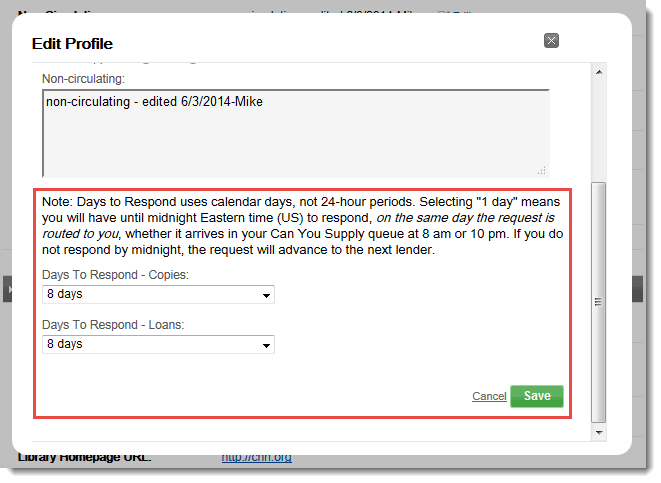
Per modificare i Giorni per rispondere:
- Una volta effettuato l'accesso alla Policy Directory, selezionare la scheda Profilo.
- Fare clic su Modifica accanto al campo Giorni per rispondere. Viene visualizzata la finestra popup Modifica profilo.
- In Giorni per rispondere, selezionare la impostazione preferita per Copie e Prestiti.
- Fare clic su Salva per salvare le modifiche o su Annulla per ricominciare. La finestra si chiude e viene visualizzato un messaggio di conferma.
Per cercare i prestatori in base a Giorni per rispondere:
- Una volta effettuato l'accesso alla directory dei criteri, utilizzare le opzioni di ricerca nella colonna di sinistra.
- Fare clic sulla freccia dell'elenco a discesa accanto al campo Giorni per rispondere per Copie o Prestiti. Viene visualizzata una finestra.
- Selezionare il valore per il numero di giorni che si desidera cercare.
- Fare clic su Cerca. Viene visualizzato un elenco dei prestatori.
Resource Sharing for Groups
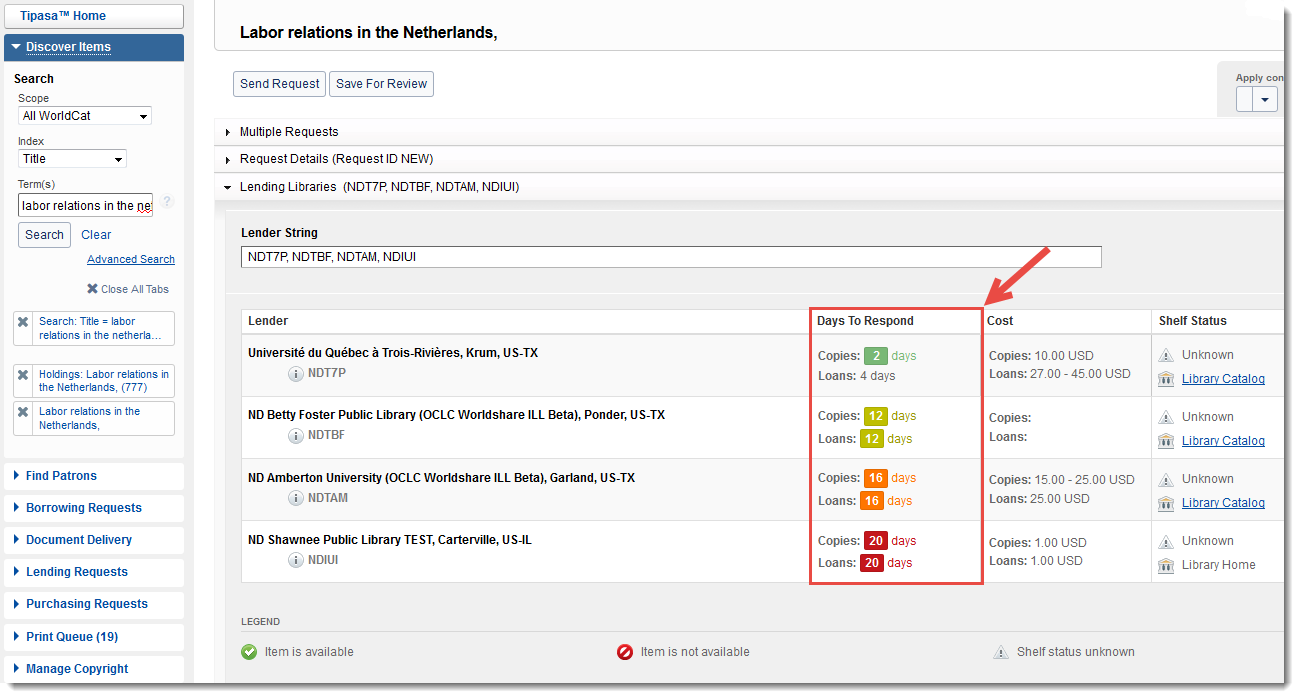
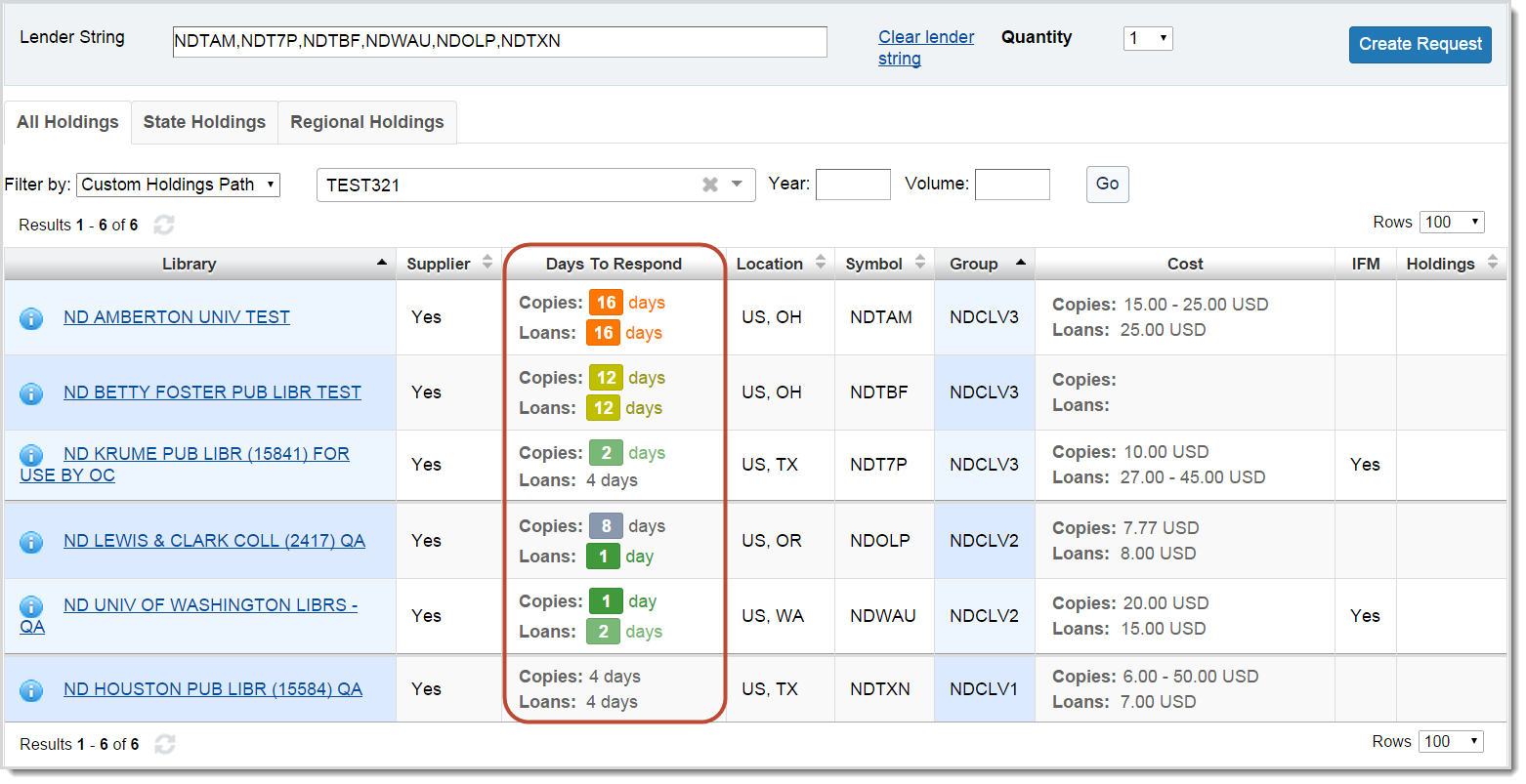
I giorni per rispondere di una biblioteca verranno elencati nella schermata del posseduto in una nuova colonna Giorni per rispondere. Nota: i giorni per rispondere sono codificati a colori per mostrare incrementi giornalieri diversi.
I giorni per rispondere saranno elencati anche in Biblioteche che effettuano il prestito nella schermata di richiesta, per qualsiasi biblioteca nella sequenza delle biblioteche che effettuano il prestito: