Questa pagina potrebbe essere generata da una traduzione automatica. La qualità e l'accuratezza della traduzione automatica possono variare significativamente da un testo all'altro. In caso di dubbi, consultare la pagina originale in inglese qui.
Find an overview of the Off-System Request queue and learn how to track requests between your library and a library or organization that is not using an OCLC resource sharing solution within the WorldShare Interlibrary Loan staff interface.
Select whether you are using the Legacy interface or the Modernized interface in Resource Sharing for Groups.
Track requests between your library and a library or organization that is not using an OCLC resource sharing solution within the WorldShare Interlibrary Loan staff interface. These off-system partners typically use email as their primary form of request communication and do not have access to a protocol-compliant ILL system.
Use the off-system request queues to track all requesting activity within WorldShare Interlibrary Loan.
In qualità di prestatario, gestire la richiesta, la ricezione e la restituzione di materiali da un prestatore esterno al sistema.
As a lender, manage reviewing, responding, sending, and processing returns from your collection to an off-system borrower.
Review off-system requests in your library's Borrower/Lender Resources Sharing Stats Report in OCLC Usage Statistics.
Nota: se si utilizza Circulation Integration con Tipasa, queste impostazioni si estendono alle richieste esterne al sistema, consentendo l'aggiornamento di queste richieste anche all'interno del sistema di circolazione. Per ulteriori informazioni, fare riferimento a Integrazione della circolazione.
Off-System request workflow
Create the off-system lending or borrowing request.
Update off-system request details as necessary.
Change the status of the request as necessary.
Se le impostazioni per Integrazione circolazione sono abilitate, immettere un codice a barre temporaneo per attivare un messaggio al sistema di circolazione locale.
Add updates from the off-system partner using Staff Notes.
Use the Email button to send emails to the off-system partner and to the library patron if necessary.
Review the Request History drop-down and Staff Notes tab for information about the request.
Use OCLC Usage Statistics to track your off-system requests.
Off-system requests appear in dedicated queues for borrowing and lending within the WorldShare Interlibrary Loan interface.
Within each queue, all active off-system requests are displayed together and can be sorted by the following column headings:
Request ID
Status
Tipo di supporto
Titolo
Patron (Borrowing only)
Off-System Borrower or Off-System Lender
Need Before
Due Date
Off-System request display
Off-system requests include the request details, bibliographic details, lender or borrower information, and request history.
Since the partner institution will communicate outside of the WorldShare Interlibrary Loan system, staff will need to manually update information in the request. All fields in the off-system request are editable throughout the active lifetime of the request. Staff will also need to manually update any status updates for the request by using the Change Status button.
Track requests between your library and a library or organization that is not using an OCLC resource sharing solution within the WorldShare Interlibrary Loan staff interface. These off-system partners typically use email as their primary form of request communication and do not have access to a protocol-compliant ILL system.
Use the off-system request queues to track all requesting activity within WorldShare Interlibrary Loan.
In qualità di prestatario, gestire la richiesta, la ricezione e la restituzione di materiali da un prestatore esterno al sistema.
As a lender, manage reviewing, responding, sending, and processing returns from your collection to an off-system borrower.
Review off-system requests in your library's Borrower/Lender Resources Sharing Stats Report in OCLC Usage Statistics.
Nota: se si utilizza Circulation Integration con Tipasa, queste impostazioni si estendono alle richieste esterne al sistema, consentendo l'aggiornamento di queste richieste anche all'interno del sistema di circolazione. Per ulteriori informazioni, fare riferimento a Integrazione della circolazione.
Off-System request workflow
Create the off-system lending or borrowing request.
Update off-system request details as necessary.
Change the status of the request as necessary.
Se le impostazioni per Integrazione circolazione sono abilitate, immettere un codice a barre temporaneo per attivare un messaggio al sistema di circolazione locale.
Add updates from the off-system partner using Staff notes.
Use the Email button to send emails to the off-system partner and to the library patron if necessary.
Review the Request history and Staff notes tabs for information about the request.
Use OCLC Usage Statistics to track your off-system requests.
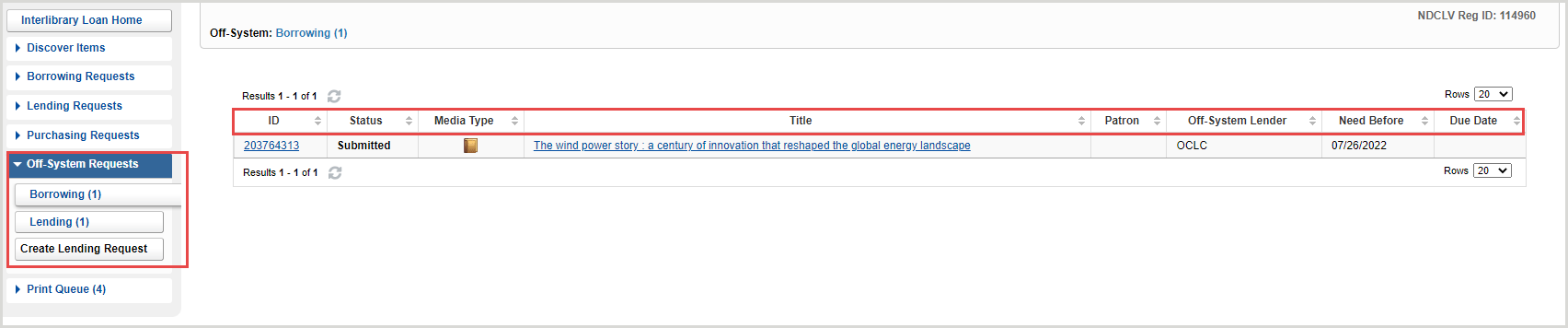
Off-system requests appear in dedicated queues for borrowing and lending within the WorldShare Interlibrary Loan interface.
Within each queue, all active off-system requests are displayed together and can be sorted by the following column headings:
ID
Status
Media type
Titolo
Patron (Borrowing only)
Off-system borrower or Off-system lender
Need before
Data di scadenza
Off-System request display
Off-system requests include the request details, bibliographic details, lender or borrower information, and request history.
Since the partner institution will communicate outside of the WorldShare Interlibrary Loan system, staff will need to manually update information in the request. All fields in the off-system request are editable throughout the request's active lifetime. Staff will also need to manually update the request's status using the Change status button.